Autonomous Maintenance Checklist: Daily Operator Checks by Machine
The operator's part of total productive maintenance (TPM), ready for 10 machine types plus a general list for any other machine: daily and weekly clean, inspect, lubricate and tighten checks, each with the abnormality to look for. Sign each check off with initials and the time, log every problem as a tag, print one page per machine, or download the free Excel and PDF. No signup.
Updated October 2026
Build your checklist
Choose the machine. Its operator checks load below on a Daily and a Weekly tab, and you can change every line.
Checklist: Pumps (centrifugal)
Edit any check or what to look for, delete what your model does not have, add your own. On the round, set each check to OK, Problem or N/A: your initials and the time go in next to it, and a problem goes into the abnormality log below. Daily checks open for a new sign-off each day and weekly checks each Monday; the earlier days of the week stay on the printed sheet. Saved in this browser only.
Abnormality log (red tag log)
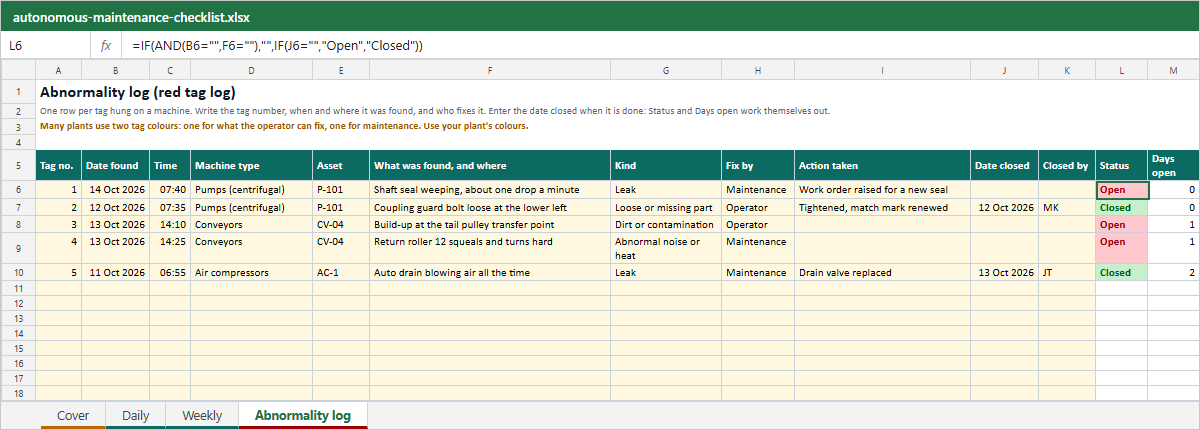
Every check set to Problem lands here as a numbered tag with the date and time. Hang a tag with the same number on the machine at the spot, decide who fixes it, and close it when it is done. You can also add an abnormality you found between rounds.
Many plants use two tag colours: one for what the operator can fix, one for maintenance. Use your plant's colours; the log only needs the number and who fixes it.
Download the checklist: Excel and PDF
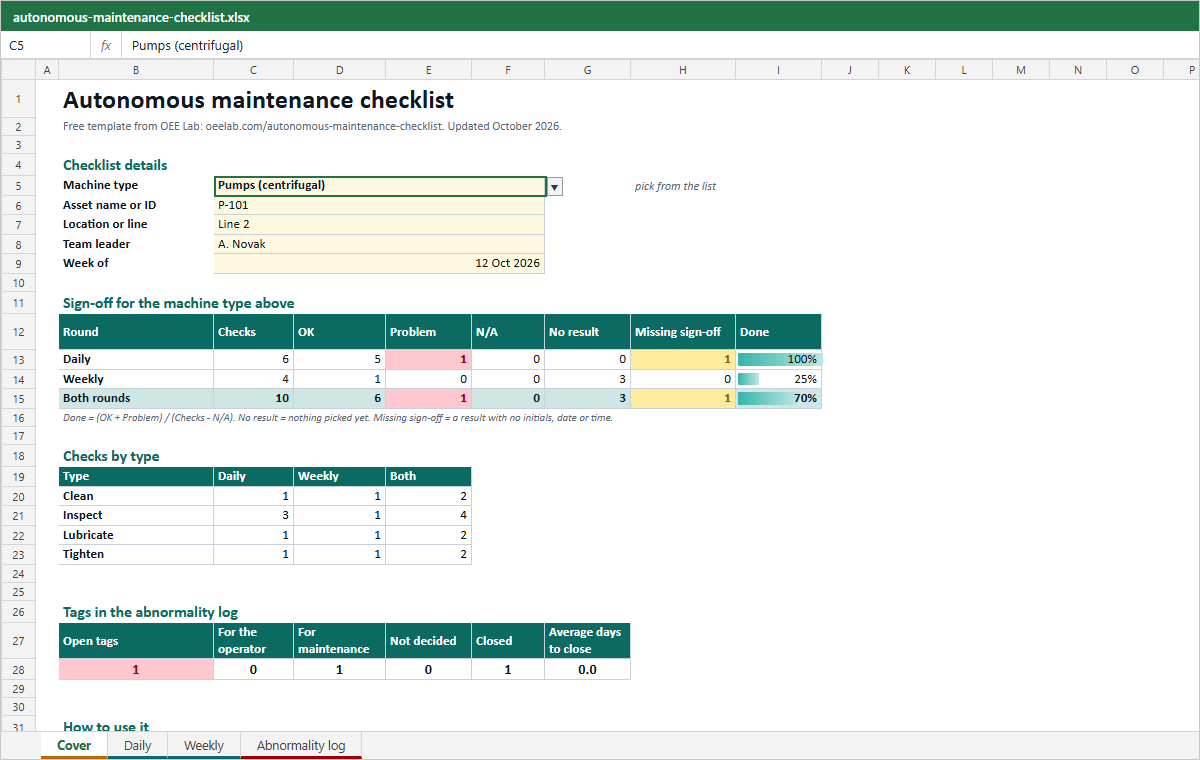
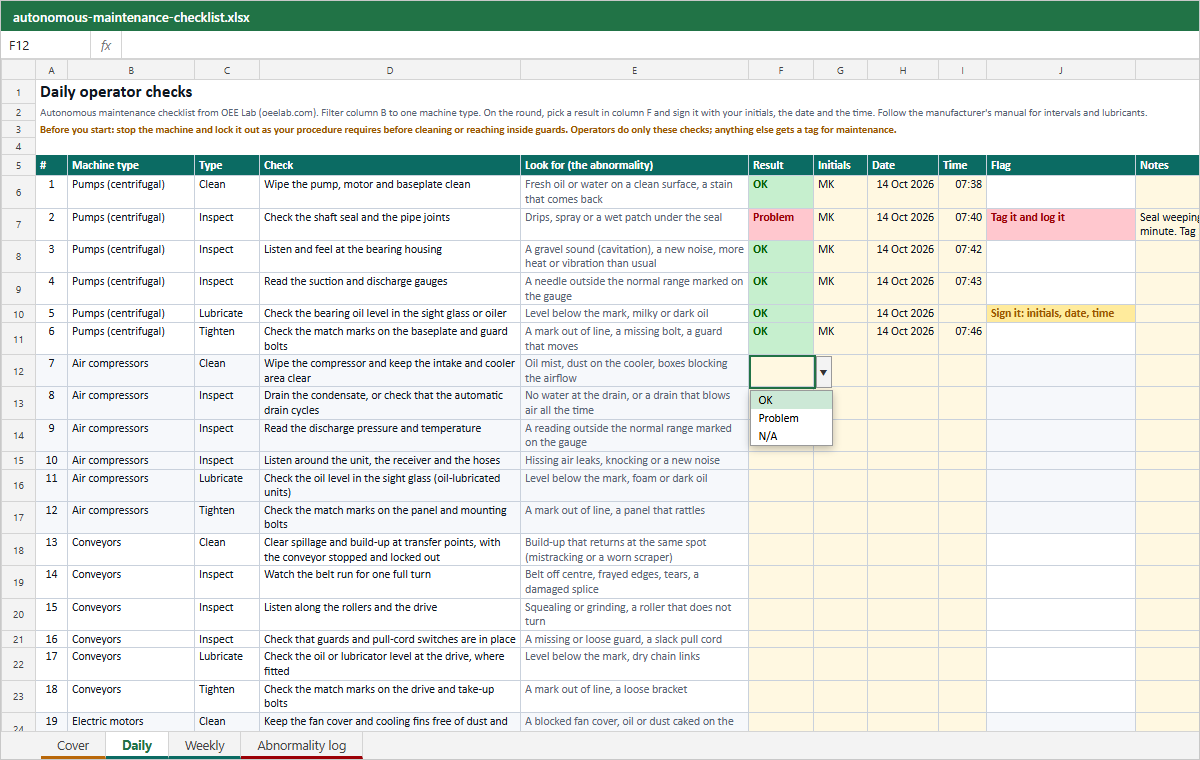
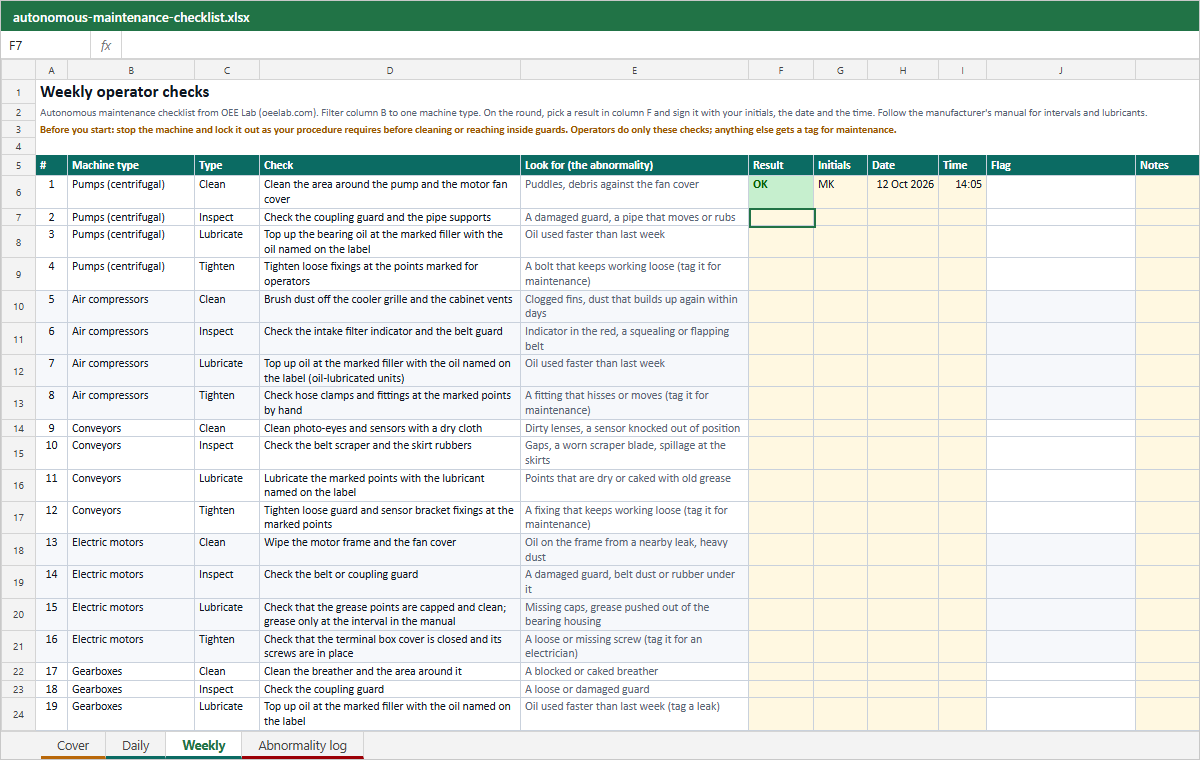
Both files hold the daily and weekly checks for all 10 machine types and the general list, free and without signup. Pick the machine type on the cover sheet of the Excel file and filter column B of the Daily and Weekly sheets to it, or print the PDF page for the machine you need.
Excel workbook (.xlsx)
A cover sheet, a Daily and a Weekly sheet and an abnormality log. Every check has a result list (OK, Problem, N/A) and columns for initials, date and time; a flag asks for a tag on a Problem and for a missing sign-off. The cover counts the results, missing sign-offs and open tags for the machine you pick. No macros.
Download Excel (.xlsx)Printable PDF
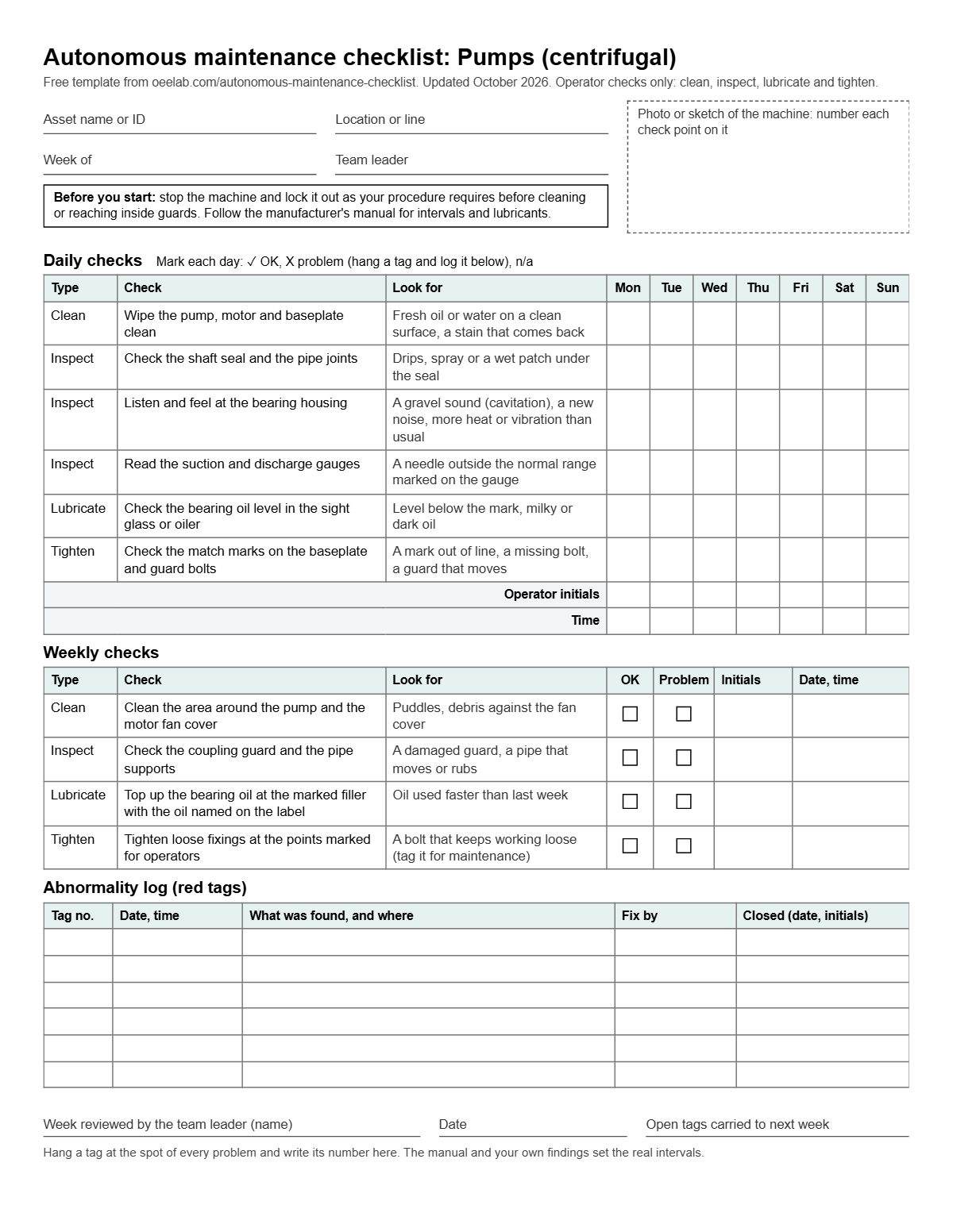
Eleven pages, one per machine type plus the general list: a box for a photo of the machine, the daily checks on a Monday to Sunday grid with the operator's initials and time, the weekly checks, a log for six tags and the team leader's weekly review. Print the page for the clipboard on the machine.
Download PDFYour edited checklist
The list you built above on one page: your asset name and wording, this week's sign-offs on the Monday to Sunday grid, and the open tags for this machine. Print it or save it as a PDF from the print dialog, or download it as a CSV to paste into your own sheet.
Run this round in the free CMMS
The free CMMS and OEE app from OEE Lab runs in your browser with no account; your data stays in this browser on this device. Add your machine on the Machines page, typed in or imported from Excel or CSV. The button below opens a periodic plan in the free CMMS with the checks of the open tab already on its checklist, every 1 day for the daily round or every 1 week for the weekly one: pick the machine, set the start date and save. For a problem, press + Task, pick the machine, paste the tag (the Copy button in the log gives you the text), attach photos, or switch it to Urgent if the machine has to stop.
Plan this round in the free CMMSA checklist sees the machine once a shift. The stops happen in between.
Fabrico, a light MES, tracks OEE and downtime live from PLCs, IoT sensors or AI cameras. Where cameras are fitted, the video of a stop sits next to its machine data, with AI-suggested likely causes the team validates, and a technician opens the work order from the stop. Data hosted in the AWS EU region; ISO 27001, ISO 9001 and ISO/IEC 20000-1 certified.
Book a Fabrico demoWant help setting this up on your line?
Leave your work email if you would like the OEE Lab team to get in touch. To keep the checklist, use the Excel or PDF download, or Print checklist above.
No newsletter, no spam.
What goes on an autonomous maintenance checklist
An autonomous maintenance checklist is the short list of care the operator gives their own machine: clean it, inspect it, lubricate the points marked for them and tighten the fasteners marked for them. Each line on this page answers four questions, because a check without them turns into a tick in a box.
- What to do: one action per line, written so a new starter can do it. "Check the shaft seal and the pipe joints" beats "check pump".
- What to look for: the abnormality that makes the check a Problem, such as drips under the seal or a needle outside the range marked on the gauge. Without it, two operators judge the same machine two ways.
- Who signed it and when: the operator's initials and the time. A round signed at the start of the shift is a different record from one filled in from memory at the end of it.
- What happened to the problem: a numbered tag on the machine and a line in the log, with who fixes it and when it was closed.
The checks are split by type: clean (cleaning is how an operator finds a leak or a loose part), inspect (look, listen, feel and read the gauges), lubricate (only external points marked for operators, with the lubricant named on the label) and tighten (match marks on accessible bolts show looseness at a glance). For why operators take this work and how the handover with maintenance works, read the autonomous maintenance guide.
How to use this checklist
- Pick the machine type, then name the asset and the line so the sheet belongs to one machine.
- Walk the machine with the operator and a technician. Check every line against the manual, delete what your model does not have, add what it needs, and write the normal range on each gauge.
- Mark the points: a label with the lubricant at each lubrication point, a match mark on each bolt operators check, a green zone on each gauge.
- Run the round. Set each check to OK, Problem or N/A; the initials and the time go in next to it. On paper, tick the day's column and sign the initials and time rows.
- Tag every problem and decide who fixes it. Close the tag when it is done, and review the open tags at the shift meeting.
Worked example: the pump checklist this page opens with
The builder opens on a centrifugal pump with 6 daily and 4 weekly checks, 250 operating days a year and one daily round:
| Round | Checks | Rounds a year | Checks a year | Share |
|---|---|---|---|---|
| Daily | 6 | 250 | 1,500 | 87.8% |
| Weekly | 4 | 52 | 208 | 12.2% |
| Total | 10 | 1,708 | 100% |
Most of the work is the daily round, so it has to be short enough to do properly at the start of a shift. Run it on every shift of a two shift plant and the daily share grows to 3,000 of 3,208 checks a year. Now say the morning round on pump P-101 finds a drip under the seal: the operator sets that check to Problem and writes "seal weeping, about one drop a minute". It lands in the abnormality log as tag 1 with the date, the time and the machine; the operator hangs tag 1 at the seal, the team leader sets it to Maintenance, and the Copy button gives the text for a task in the free CMMS.
Where this checklist fits in the seven steps
Autonomous maintenance is usually rolled out in seven steps. The autonomous maintenance guide explains each one; this table shows which part of this page you use at each step.
| Step | What the team does | What to use here |
|---|---|---|
| 1. Initial cleaning | Clean the machine back to base condition and find every defect on the way. | The abnormality log: one tag per defect found during the first deep clean. |
| 2. Sources of dirt and hard-to-reach spots | Fix what makes the mess and what makes cleaning or checking slow. | The Kind column of the Excel log, to sort tags into leaks, dirt and hard-to-reach places. |
| 3. Provisional standards | Write down what to clean, inspect, lubricate and tighten, how often and what good looks like. | This checklist, edited for your machine in the builder or the Excel file. |
| 4. General inspection training | Teach how the drives, hydraulics, pneumatics and fasteners work, so checks find real defects. | The Look for column: each check names the abnormality the training should explain. |
| 5. Autonomous inspection | Merge the operator checks with the technicians' PM, so nothing is done twice or missed. | Compare with the preventive maintenance checklist template. |
| 6. Standardization | Extend the routine to tools, materials and the area around the machine. | The 5S workplace organization guide. |
| 7. Self-management | The team runs and improves its own standards and tracks its own losses. | The cover sheet counts and the open tags, reviewed at the shift meeting. |
The 11 checklists, check by check
Every operator check in the builder, the Excel file and the PDF, by machine type, with what to look for. Load any list into the builder above to change it, sign it off and print it.
Pumps (centrifugal)
10 checks
This checklist is open in the builder above. Go to the builder
Daily
- Clean: Wipe the pump, motor and baseplate clean Look for: fresh oil or water on a clean surface, a stain that comes back
- Inspect: Check the shaft seal and the pipe joints Look for: drips, spray or a wet patch under the seal
- Inspect: Listen and feel at the bearing housing Look for: a gravel sound (cavitation), a new noise, more heat or vibration than usual
- Inspect: Read the suction and discharge gauges Look for: a needle outside the normal range marked on the gauge
- Lubricate: Check the bearing oil level in the sight glass or oiler Look for: level below the mark, milky or dark oil
- Tighten: Check the match marks on the baseplate and guard bolts Look for: a mark out of line, a missing bolt, a guard that moves
Weekly
- Clean: Clean the area around the pump and the motor fan cover Look for: puddles, debris against the fan cover
- Inspect: Check the coupling guard and the pipe supports Look for: a damaged guard, a pipe that moves or rubs
- Lubricate: Top up the bearing oil at the marked filler with the oil named on the label Look for: oil used faster than last week
- Tighten: Tighten loose fixings at the points marked for operators Look for: a bolt that keeps working loose (tag it for maintenance)
Air compressors
10 checks
This checklist is open in the builder above. Go to the builder
Daily
- Clean: Wipe the compressor and keep the intake and cooler area clear Look for: oil mist, dust on the cooler, boxes blocking the airflow
- Inspect: Drain the condensate, or check that the automatic drain cycles Look for: no water at the drain, or a drain that blows air all the time
- Inspect: Read the discharge pressure and temperature Look for: a reading outside the normal range marked on the gauge
- Inspect: Listen around the unit, the receiver and the hoses Look for: hissing air leaks, knocking or a new noise
- Lubricate: Check the oil level in the sight glass (oil-lubricated units) Look for: level below the mark, foam or dark oil
- Tighten: Check the match marks on the panel and mounting bolts Look for: a mark out of line, a panel that rattles
Weekly
- Clean: Brush dust off the cooler grille and the cabinet vents Look for: clogged fins, dust that builds up again within days
- Inspect: Check the intake filter indicator and the belt guard Look for: indicator in the red, a squealing or flapping belt
- Lubricate: Top up oil at the marked filler with the oil named on the label (oil-lubricated units) Look for: oil used faster than last week
- Tighten: Check hose clamps and fittings at the marked points by hand Look for: a fitting that hisses or moves (tag it for maintenance)
Conveyors
10 checks
This checklist is open in the builder above. Go to the builder
Daily
- Clean: Clear spillage and build-up at transfer points, with the conveyor stopped and locked out Look for: build-up that returns at the same spot (mistracking or a worn scraper)
- Inspect: Watch the belt run for one full turn Look for: belt off centre, frayed edges, tears, a damaged splice
- Inspect: Listen along the rollers and the drive Look for: squealing or grinding, a roller that does not turn
- Inspect: Check that guards and pull-cord switches are in place Look for: a missing or loose guard, a slack pull cord
- Lubricate: Check the oil or lubricator level at the drive, where fitted Look for: level below the mark, dry chain links
- Tighten: Check the match marks on the drive and take-up bolts Look for: a mark out of line, a loose bracket
Weekly
- Clean: Clean photo-eyes and sensors with a dry cloth Look for: dirty lenses, a sensor knocked out of position
- Inspect: Check the belt scraper and the skirt rubbers Look for: gaps, a worn scraper blade, spillage at the skirts
- Lubricate: Lubricate the marked points with the lubricant named on the label Look for: points that are dry or caked with old grease
- Tighten: Tighten loose guard and sensor bracket fixings at the marked points Look for: a fixing that keeps working loose (tag it for maintenance)
Electric motors
9 checks
This checklist is open in the builder above. Go to the builder
Daily
- Clean: Keep the fan cover and cooling fins free of dust and debris Look for: a blocked fan cover, oil or dust caked on the fins
- Inspect: Feel for heat, or use an infrared thermometer, and listen Look for: hotter or louder than usual, a new hum or rattle
- Inspect: Look at the terminal box and the cable entry Look for: a burning smell, discoloration, a damaged cable or gland
- Inspect: Watch the motor and the driven machine run together Look for: more vibration than usual, a guard that rattles
- Tighten: Check the match marks on the mounting bolts Look for: a mark out of line, a missing bolt
Weekly
- Clean: Wipe the motor frame and the fan cover Look for: oil on the frame from a nearby leak, heavy dust
- Inspect: Check the belt or coupling guard Look for: a damaged guard, belt dust or rubber under it
- Lubricate: Check that the grease points are capped and clean; grease only at the interval in the manual Look for: missing caps, grease pushed out of the bearing housing
- Tighten: Check that the terminal box cover is closed and its screws are in place Look for: a loose or missing screw (tag it for an electrician)
Gearboxes
9 checks
This checklist is open in the builder above. Go to the builder
Daily
- Clean: Wipe the housing so leaks and heat show Look for: fresh oil on the housing, dirt caked on the fins
- Inspect: Listen and feel for noise, heat and vibration Look for: a whine, knocking, or hotter than usual
- Inspect: Check the shaft seals and the drain plug Look for: drips or a wet patch
- Lubricate: Check the oil level in the sight glass Look for: level below the mark, foamy, milky or dark oil
- Tighten: Check the match marks on the mounting and torque arm bolts Look for: a mark out of line, a missing bolt
Weekly
- Clean: Clean the breather and the area around it Look for: a blocked or caked breather
- Inspect: Check the coupling guard Look for: a loose or damaged guard
- Lubricate: Top up oil at the marked filler with the oil named on the label Look for: oil used faster than last week (tag a leak)
- Tighten: Check the guard fixings at the marked points Look for: a bolt that turns by hand (tag it for maintenance)
Filling machines
11 checks
This checklist is open in the builder above. Go to the builder
Daily
- Clean: Clean and sanitize product contact parts as your cleaning procedure requires Look for: product build-up, residue left after cleaning
- Clean: Clean drips and spills from the frame and the conveyors Look for: spills that return at the same nozzle
- Inspect: Check fill weights or volumes at start-up Look for: a fill outside the specification
- Inspect: Check the nozzles Look for: drips, blockages or damage
- Inspect: Check guards, doors and interlocks Look for: a door that lets the machine run open, a damaged interlock
- Inspect: Check the air pressure at the regulator Look for: a needle outside the normal range, water in the filter bowl
- Tighten: Check change parts and guides against their match marks Look for: a change part loose or out of position
Weekly
- Clean: Clean photo-eyes and sensors Look for: dirty lenses, a sensor out of position
- Inspect: Check the seals and O-rings you can see on valves and nozzles Look for: cracks, swelling or leaks
- Lubricate: Lubricate the marked points with the food grade lubricant named on the label Look for: dry points, old grease near the product
- Tighten: Check the hand screws on change parts and guides Look for: a screw that works loose during the week (tag it for maintenance)
Packaging machines
10 checks
This checklist is open in the builder above. Go to the builder
Daily
- Clean: Clean film, glue and product residue from the forming, sealing and cutting areas, with the machine stopped Look for: residue on the sealing jaws, glue strings
- Inspect: Check seal quality on the first packs Look for: weak, wrinkled or leaking seals, misprints
- Inspect: Check guards, doors and interlocks Look for: a door that lets the machine run open, a damaged interlock
- Inspect: Check the air pressure at the main regulator Look for: a needle outside the normal range, water in the filter bowl
- Lubricate: Check the oil level in the air line lubricator, where fitted Look for: level below the mark, no drip in the sight dome
- Tighten: Check format parts and guides against their match marks Look for: a part loose or out of position
Weekly
- Clean: Clean sensors, photo-eyes and the print mark reader Look for: dirty lenses, false stops
- Inspect: Check the knives, belts and suction cups you can see Look for: nicks, frayed belts, torn suction cups
- Lubricate: Lubricate the marked points with the lubricant named on the label Look for: dry points, dirty old grease
- Tighten: Check the hand screws and quick clamps on format parts Look for: a screw that works loose (tag it for maintenance)
CNC machines
10 checks
This checklist is open in the builder above. Go to the builder
Daily
- Clean: Clear chips from the work area, the way covers and the chip conveyor Look for: chips packed under the way covers, a jammed conveyor
- Inspect: Check coolant level and concentration with a refractometer Look for: low level, concentration outside the range, smell or foam
- Inspect: Check the air pressure and drain the air filter bowl Look for: low pressure, water in the bowl
- Inspect: Check the door window, the door interlock and the work light Look for: a cracked window, an interlock that does not stop the machine
- Lubricate: Check the way lube and spindle lube levels Look for: level below the mark, or a level that never drops (lube not pumping)
- Tighten: Check vise and fixture bolts against their match marks Look for: a mark out of line, a fixture that moves
Weekly
- Clean: Clean the coolant tank screens and skim off tramp oil Look for: an oil film on the coolant, blocked screens
- Inspect: Check the way covers and wipers Look for: torn wipers, dented covers, chips getting under
- Lubricate: Fill the way lube tank with the oil named on the label Look for: oil used faster or slower than last week
- Tighten: Check cover and guard fixings at the marked points Look for: a rattling cover (tag it for maintenance)
Injection molding machines
11 checks
This checklist is open in the builder above. Go to the builder
Daily
- Clean: Wipe the machine and the area under the barrel and the hopper Look for: oil on the frame, plastic dust, spilled granules
- Inspect: Check the hydraulic oil level and temperature Look for: level below the mark, hotter than usual
- Inspect: Check the mold cooling water flow and hose connections Look for: leaking hoses, a flow indicator that does not turn
- Inspect: Look for oil, water and material leaks Look for: drips under hoses, at the nozzle or at the cylinders
- Inspect: Check the safety gate and its interlocks Look for: a gate that does not stop the machine
- Lubricate: Check the central lubrication reservoir level Look for: level below the mark, a lubrication alarm on the screen
- Tighten: Check mold clamps and water hose clamps against their match marks Look for: a clamp out of line or loose
Weekly
- Clean: Clean the hopper area and the dryer filter Look for: dust and fines in the filter
- Inspect: Check the heater zone temperatures against the set points Look for: a zone that cannot reach its set point
- Lubricate: Top up the central lubrication reservoir with the grease or oil named on the label Look for: used faster than last week
- Tighten: Check guard and safety gate fixings at the marked points Look for: a bolt that turns by hand (tag it for maintenance)
Hydraulic systems
10 checks
This checklist is open in the builder above. Go to the builder
Daily
- Clean: Wipe the power unit, hoses and cylinders so new leaks show Look for: fresh oil on a surface you cleaned
- Inspect: Check the oil level and temperature Look for: level below the mark, foamy or milky oil, hotter than usual
- Inspect: Look along hoses, fittings and cylinders Look for: drips, wet fittings, rubbing or bulging hoses
- Inspect: Read the system pressure Look for: a needle outside the normal range marked on the gauge
- Inspect: Listen to the pump Look for: a whine or a gravel sound (cavitation)
- Tighten: Check hose clamps and the pump mounting against their match marks Look for: a mark out of line, a clamp that moves
Weekly
- Clean: Clean around the breather and the filler cap Look for: dirt around the cap, a blocked breather
- Inspect: Check the filter condition indicators Look for: indicator in the red
- Lubricate: Top up oil through the filler filter with the oil named on the label Look for: oil used faster than last week (tag a leak)
- Tighten: Check hose clamps and brackets at the marked points Look for: a clamp that moves, a hose that rubs (tag it for maintenance)
Any other machine (general checks)
10 checks
This checklist is open in the builder above. Go to the builder
Daily
- Clean: Wipe the machine and the floor around it so leaks and loose parts show Look for: fresh oil or water on a clean surface, parts on the floor
- Inspect: Look, listen and feel while the machine runs Look for: a new noise, more heat or vibration, a burning smell
- Inspect: Read every gauge and display the operator uses Look for: a value outside the normal range marked on it, an alarm
- Inspect: Check that guards, covers and emergency stops are in place Look for: a missing or loose guard, a blocked emergency stop
- Lubricate: Check the oil level at each sight glass marked for operators Look for: level below the mark, milky, foamy or dark oil
- Tighten: Check the match marks on accessible bolts and fixings Look for: a mark out of line, a missing bolt, a part that moves
Weekly
- Clean: Clean the vents, fans, filters and sensors you can reach Look for: clogged vents, dirty lenses, dust that returns within days
- Inspect: Check the belts, chains, hoses and cables you can see Look for: fraying, cracks, rubbing, a sagging belt or chain
- Lubricate: Lubricate the marked points with the lubricant named on the label Look for: dry points, old caked grease, used faster than last week
- Tighten: Check handles, clamps and hand screws at the marked points Look for: a fixing that keeps working loose (tag it for maintenance)
Common mistakes
- A check with no "look for". "Check the pump" gets ticked OK every day. Name the abnormality, and mark the normal range on every gauge so the reading needs no judgement.
- Signing the whole round at once. A column of identical times at the end of the shift means the round was filled in from memory. The time next to each check is there to show when it was done.
- A problem written in the notes and nowhere else. A finding with no tag number and no owner is a failure you already knew about. Every Problem gets a tag, and every tag gets closed.
- Handing operators work that belongs to maintenance. Anything that needs tools beyond the basics, special skills, a permit or opening the machine stays with technicians. Operators find it and tag it.
- Cleaning a running machine. Stop it and lock it out as your procedure requires before cleaning or reaching inside guards, every time.
- The wrong lubricant, or too much of it. Label each point with the lubricant and the amount from the manual. More grease is not better.
- Never changing the list. When the same tag keeps coming back, fix the source; when a check never finds anything, move it to the weekly round. Track the effect on the six big losses and with the MTBF and MTTR calculator.
When a check finds a problem
The troubleshooting guides list the usual causes and fixes, for the technician who takes the tag:
- Centrifugal pump troubleshooting
- Conveyor troubleshooting
- Electric motor troubleshooting
- Packaging line troubleshooting
- Injection molding troubleshooting
- Bearing troubleshooting
- Coupling troubleshooting
- Lubrication system troubleshooting
For every other machine, start at the maintenance troubleshooting directory. For the bigger picture, read the TPM guide and the autonomous maintenance guide; for the technicians' side of the same machines, use the preventive maintenance checklist template.
Autonomous maintenance checklist FAQ
What is an autonomous maintenance checklist?
The list of routine care an operator gives their own machine, usually at the start of the shift: cleaning, inspecting, lubricating and tightening, each with the abnormality to look for and a sign-off. It is the operator's part of TPM; technicians keep the repairs and any work that needs tools, special skills or lockout.
What are the four basic tasks of autonomous maintenance?
Clean, inspect, lubricate and tighten, often shortened to CILT. Cleaning comes first because it is how an operator finds a leak, a crack or a loose bolt. Lubrication covers only the external points marked for operators, with the lubricant named on the label, and tightening covers the fasteners marked for operators, usually with match marks that show looseness at a glance.
How often should operators do autonomous maintenance checks?
Follow the manufacturer's manual for intervals. A common pattern is a short daily round at the start of the shift and a longer weekly round, which is how this checklist is split. Shorten an interval when the same abnormality keeps coming back, and move a check to the weekly round when it never finds anything.
What is a red tag in autonomous maintenance?
A tag hung on the machine at the spot where an operator found an abnormality, such as a leak, a loose part, dirt or a place that is hard to reach, with a number, the date and what was found. Many plants use two colours, one for what the operator can fix and one for maintenance. The same number goes in the abnormality log, so every tag has an owner and a closing date.
What are the 7 steps of autonomous maintenance?
Initial cleaning, removing the sources of dirt and the hard-to-reach spots, provisional standards for cleaning, inspection and lubrication, general inspection training, autonomous inspection, standardization of the workplace, and self-management by the team. This checklist is the step 3 standard; the autonomous maintenance guide on this site explains each step.
What is the difference between autonomous maintenance and preventive maintenance?
Autonomous maintenance is the care the operator does: short, frequent checks with the senses and simple tools. Preventive maintenance is the scheduled work technicians do: measurements, adjustments, part changes and anything that needs lockout or special skills. The two lists should not overlap; the preventive maintenance checklist template on this site holds the technician side.
Can I use this checklist in Excel or as a PDF?
Yes. The Excel file has a cover sheet, a Daily and a Weekly sheet with all 10 machine types and the general list, with columns for the result, the operator's initials, the date and the time, and an abnormality log that counts open and closed tags. The PDF has one page per machine type with a box for a photo of the machine, a Monday to Sunday sign-off grid, the weekly checks and space for tags. Both are free with no signup, and you can also edit the list on this page and print it.
Is this a TPM checklist?
It covers autonomous maintenance, the total productive maintenance (TPM) pillar that operators run every shift. Planned maintenance, the technicians' pillar, is in the preventive maintenance checklist template on this site.
All templates · PM checklist template · Maintenance work order template · Autonomous maintenance guide