Your shift
One machine or line, one shift, day or week. What counts as each input
Marks: 55 and 65 published averages, 85 world-class (sources)
Where the pieces went
Each factor against world-class
What one OEE point is worth in money optional
Type what one good piece is worth to you, in any currency, to turn the pieces above into money.
World-class split of 90% availability, 95% performance and 99% quality, the figure usually traced to Seiichi Nakajima's Introduction to TPM (1988). Sources for every figure are in the benchmark table.
Several machines or lines
One row per machine or line, all for the same period. Sample lines are filled in; type over them.
Combined OEE adds up the minutes and pieces of every row and divides once, instead of averaging the percentages, because an average gives a line that ran 4 hours the same weight as one that ran 8.
Want a second look at this result?
Leave your work email if you would like the OEE Lab team to get in touch about your numbers. To keep the result, use Copy link or Print above.
No newsletter, no spam.
This number shows the short stops, not what caused them.
A calculator sees short stops only as lost speed, with no cause and no time. Fabrico, a light MES, tracks OEE and downtime live from PLCs, IoT sensors or AI cameras. Where cameras are fitted, the video of a stop sits next to its machine data, and a technician opens the work order from the stop.
Book a demo See how Fabrico tracks OEEHow to calculate OEE: the formula, step by step
OEE = Availability × Performance × Quality
OEE is the share of planned production time spent making good pieces at full speed. Work it out for one machine or line over one period, a shift, a day or a week, in four steps:
- Availability = run time ÷ planned production time. Run time is planned production time minus every stop: breakdowns, changeovers and setups, waiting for material or an operator.
- Performance = (ideal cycle time × total count) ÷ run time. It catches what availability misses: minor stops and running below the ideal speed.
- Quality = good count ÷ total count. Good means right first time, so a reworked piece is not a good piece.
- OEE = availability × performance × quality.
To check the answer, use the shortcut: OEE = (good count × ideal cycle time) ÷ planned production time. It gives the same number once the units match, so convert the seconds of ideal time to minutes first.
OEE comes from Seiichi Nakajima's total productive maintenance programme (Muchiri and Pintelon, 2008).
What counts as each input
| Input | Count it | Leave it out |
|---|---|---|
| Planned production time | The time the machine was scheduled to run | Breaks, planned meetings and time with no orders (TEEP counts those, OEE does not) |
| Down time | Every stop inside planned time: breakdowns, changeovers and setups, waiting for material, an operator or a quality release | Short stops nobody logs; they land in performance instead |
| Ideal cycle time | The fastest proven time for one piece of this product, in seconds | The average or the planned standard, which already hide slow running |
| Total pieces | Every piece made, good and bad, startup rejects included | Pieces made on another machine or line |
| Reject pieces | Scrap, rework and startup rejects | Nothing: a piece that was not right first time is a reject |
Worked example: one shift on a bottling line
A bottling line runs an 8 hour shift (480 minutes) with a 30 minute planned break. During the shift it has a 25 minute breakdown and a 20 minute changeover. The ideal cycle time is 2 seconds per bottle; the line makes 10,800 bottles and 270 of them are rejected.
| Step | Calculation | Result |
|---|---|---|
| Planned production time | 480 - 30 | 450 min |
| Down time | 25 + 20 | 45 min |
| Run time | 450 - 45 | 405 min |
| Availability | 405 ÷ 450 | 90.0% |
| Ideal time for 10,800 bottles | 10,800 × 2 s ÷ 60 | 360 min |
| Performance | 360 ÷ 405 | 88.9% |
| Good count | 10,800 - 270 | 10,530 |
| Quality | 10,530 ÷ 10,800 | 97.5% |
| OEE | 90.0% × 88.9% × 97.5% | 78.0% |
The shortcut agrees: 10,530 good bottles × 2 seconds is 351 minutes of good output at full speed, and 351 ÷ 450 = 78.0%. Counted in bottles, the line could have made 13,500 in its planned time. It lost 1,350 to the two stops, another 1,350 to minor stops and slow running, and 270 to rejects. The biggest gap to world-class is performance, 88.9% against 95%, so the first place to look on this line is short stops and speed, not breakdowns.
OEE for several machines or lines
Switch to Several machines or lines at the top of the calculator. Each row gets its own availability, performance, quality and OEE, and the combined figure is calculated once from the totals:
- Combined availability = total run time ÷ total planned production time.
- Combined performance = total ideal time ÷ total run time.
- Combined quality weights each good piece by its ideal cycle time, so a piece from a slow machine counts for more than one from a fast machine. When every row has the same ideal cycle time, this is simply total good ÷ total count.
Multiplied together, the three give total good output time ÷ total planned time. With the three sample lines, combined OEE is 76.1%, while a plain average of the three row figures reads 73.5%: line 3 had only 240 of the 1,140 planned minutes, but the average counts it as a full third.
Machines in series on one line are a different case. The line only makes what its slowest step lets through, so OEE is usually measured for the line as a whole, at the bottleneck or at the last machine, not by adding the machines together.
OEE and the six big losses
The six big losses come from the total productive maintenance (TPM) work of Seiichi Nakajima, published in English as Introduction to TPM (1988), the same programme OEE comes from (Muchiri and Pintelon, 2008). Each loss lowers exactly one OEE factor, which tells you where it goes in this calculator:
| Loss, with an example from the bottling line | OEE factor | Where it goes here |
|---|---|---|
| Equipment failure: the capper jams and waits for a technician | Availability | Down time |
| Setup and adjustments: the changeover from small to large bottles | Availability | Down time |
| Idling and minor stops: a tipped bottle on the infeed, cleared in 30 seconds | Performance | Nothing to type: it shows in performance |
| Reduced speed: running at 1,500 bottles an hour against an ideal 1,800 | Performance | Nothing to type: it shows in performance |
| Process defects: underfilled bottles during the run | Quality | Reject pieces |
| Reduced yield: bottles scrapped while the line settles after the changeover | Quality | Reject pieces |
If your team logs short stops, put them in down time instead, but never in both places. Studies of Swedish plants found speed and short-stop losses to be the largest category (Ljungberg, 1998; Ylipää et al., 2017), and that most of them go unrecorded: across 884 machines, unclassified losses were about 19% of scheduled production time, more than half of all the loss time recorded (Hedman et al., 2016). To split your own lost minutes, use the six big losses calculator.
OEE benchmarks, with their sources
No neutral OEE benchmark by industry with a stated method turned up when these sources were checked in October 2026. These are the figures that do have a source. Check what each one measured before you compare a machine with it.
| Figure | What it measured | Source |
|---|---|---|
| 85% (90% × 95% × 99%) | The world-class figure: 90% availability, 95% performance, 99% quality. A target, not an average. | Nakajima, Introduction to TPM (1988); origin of OEE in TPM per Muchiri and Pintelon (2008) |
| About 55% | Average OEE across about 20 cases | Ljungberg (1998) |
| 65% average 70% median | 884 machines in 23 Swedish companies, measured automatically from October 2013 to March 2014. 702 machines recorded the system's default 100% performance and 796 its default 100% quality, so the figure mostly counts stops. | Hedman et al. (2016), thesis, p. 34 |
| 11% to 49% | Sterile pharma filling lines only: 11% bottom quartile, 35% top quartile, 49% top decile | McKinsey (January 2023) |
| 7.8% of planned time | Unplanned downtime as a share of planned production time, US discrete manufacturing, 2016 survey data | NIST AMS 100-34 (Thomas and Weiss, 2020), Table 5.1 |
The best comparison for a machine is its own trend, measured the same way every shift. To see which losses a sector usually fights, use the industry guides, for example food and beverage, automotive, packaging and injection moulding, or the OEE benchmark report.
Common mistakes when calculating OEE
- Using the average cycle time as the ideal. The average already contains the slow running, so performance looks better than it is. Use the fastest rate the machine has proven for that product.
- Counting reworked pieces as good. Quality in OEE is right first time. A piece that needed rework is a reject, even if it ships in the end.
- Counting short stops twice, or not at all. A stop logged in down time must not also be blamed on performance, and the short stops nobody logs have to show up somewhere: in performance.
- Averaging OEE percentages across machines, shifts or days instead of adding up the minutes and pieces. The several machines mode does the sums for you.
- Moving the boundary between planned time and down time. If breaks come out of planned time on one line and count as down time on another, the two OEE figures cannot be compared. Write the rule down and keep it for every machine.
OEE calculator in Excel (free download)
Prefer a spreadsheet? The same calculator as an Excel workbook, with no macros and no sign-up:
- OEE calculator sheet: the five inputs in yellow cells, formulas for run time, availability, performance, quality and OEE, the pieces lost to each factor and what one OEE point is worth, in pieces and, once you type the value of a piece, in money.
- Several machines sheet: up to 20 machines or lines, with availability, performance, quality and OEE per row and the combined OEE from summed minutes and pieces.
- Notes sheet: the formulas, what counts as each input, the six big losses and the sources.
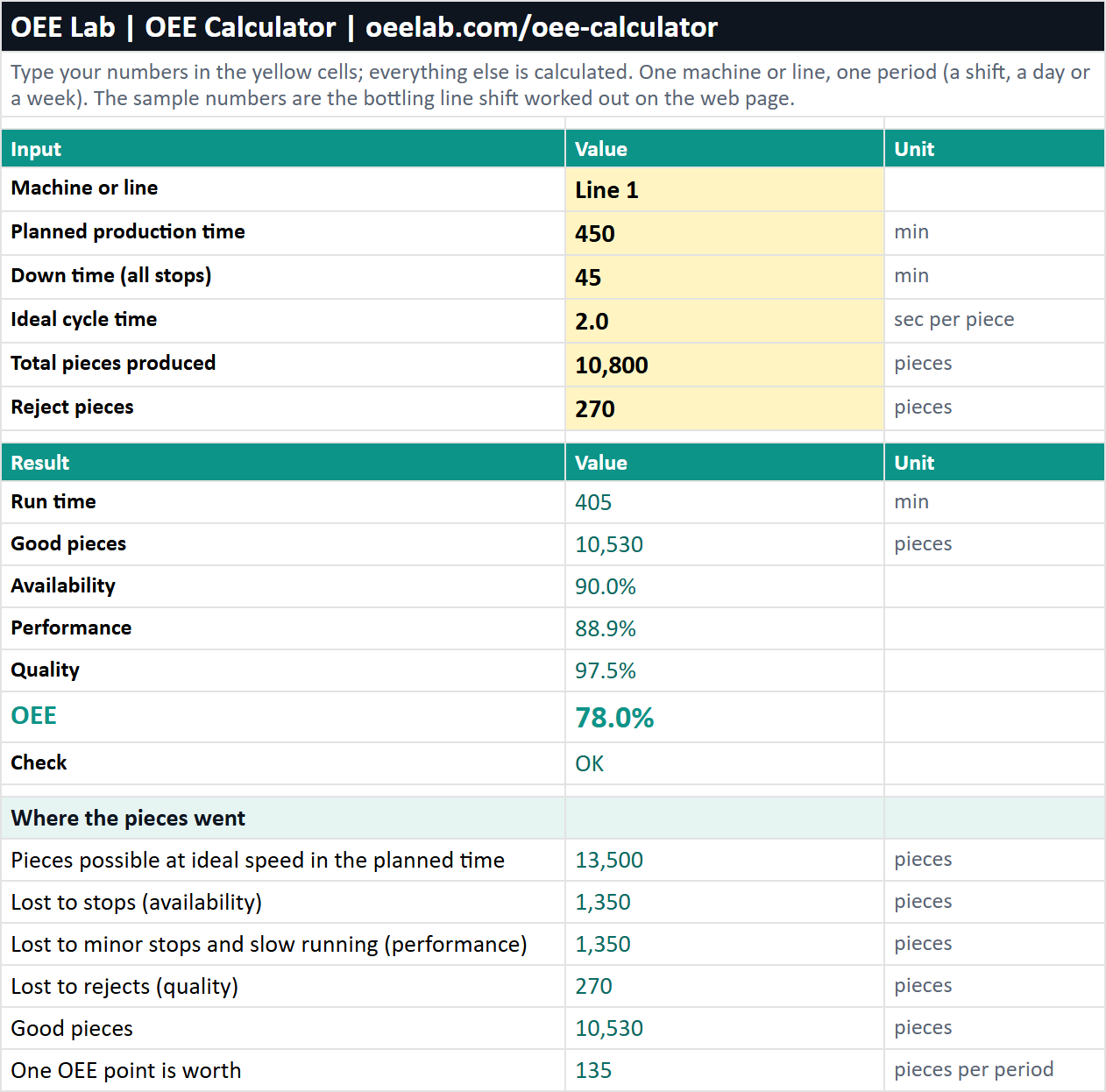
To log every shift with weekly totals and the six big losses, use the OEE tracking template.
Download the Excel version (.xlsx, 17 KB)
When one machine pulls OEE down
Start from its troubleshooting guide in the troubleshooting directory, for example packaging line troubleshooting or injection moulding troubleshooting. Put a number on the losses with the downtime cost calculator and the hidden factory calculator. To roll OEE out across lines, see how to implement OEE and OEE data collection methods.
OEE calculator FAQ
How do you calculate OEE?
Multiply availability by performance by quality. Availability is run time divided by planned production time, performance is ideal cycle time times total count divided by run time, and quality is good count divided by total count. A shift with 90% availability, 88.9% performance and 97.5% quality has an OEE of 78.0%.
Is there a shortcut to check an OEE calculation?
Yes. OEE = (good count × ideal cycle time) ÷ planned production time gives the same number as availability × performance × quality, because both are the share of planned time spent making good pieces at full speed. Convert the ideal cycle time to minutes first if the planned time is in minutes.
What is a good OEE score?
85% is the world-class figure usually traced to Seiichi Nakajima's Introduction to TPM (1988): 90% availability, 95% performance and 99% quality. Published studies found averages of about 55% (Ljungberg, 1998, about 20 cases) and 65% (Hedman et al., 2016, 884 machines in 23 Swedish companies). Compare a machine with its own trend before you compare it with another plant.
What is an example of an OEE calculation?
A bottling line plans 450 minutes, stops for 45, has an ideal cycle time of 2 seconds per bottle and makes 10,800 bottles, 270 of them rejects. Availability is 405 ÷ 450 = 90.0%, performance is 360 ÷ 405 minutes = 88.9%, quality is 10,530 ÷ 10,800 = 97.5%, so OEE is 78.0%.
How do you calculate OEE for multiple machines?
Add up the planned time, the run time, the ideal time and the ideal time of the good pieces (good count × ideal cycle time) of all the machines, and calculate OEE once from the totals: total ideal time of good pieces ÷ total planned time. Do not average the percentages, because then a machine that ran for half the shift counts as much as one that ran all of it. Machines in series on one line are the exception: measure the line as a whole.
Can you calculate OEE in Excel?
Yes. The free Excel version of this calculator has the same five inputs, formulas for availability, performance, quality and OEE, a sheet for up to 20 machines or lines with combined totals, and a notes sheet with the formulas and sources. It has no macros and needs no sign-up.
Why is my OEE performance over 100%?
The ideal cycle time is set slower than the machine really runs, or a count is wrong. Set the ideal cycle time to the fastest rate the machine has proven for that product. This calculator caps performance at 100% and says so when it does.
What is the difference between OEE and TEEP?
OEE measures only the planned production time. TEEP measures all calendar time, so it also counts the hours the machine was not scheduled. TEEP is OEE multiplied by utilization, so it is never higher than OEE.
Related: what OEE is · availability calculator · TEEP calculator · choosing OEE and CMMS software