Downtime Log Template
A free machine downtime log for Excel, for the clipboard and for your browser. Write down each stop with its machine, start and end time and reason; the workbook works out the minutes, ranks the reasons in a Pareto and gives MTTR and availability for every machine. No signup, no email.
Updated October 2026
Download the template
Standard formulas only (SUMIFS, COUNTIFS, LARGE, INDEX, MATCH), no macros, nothing to enable. Free to use and change.
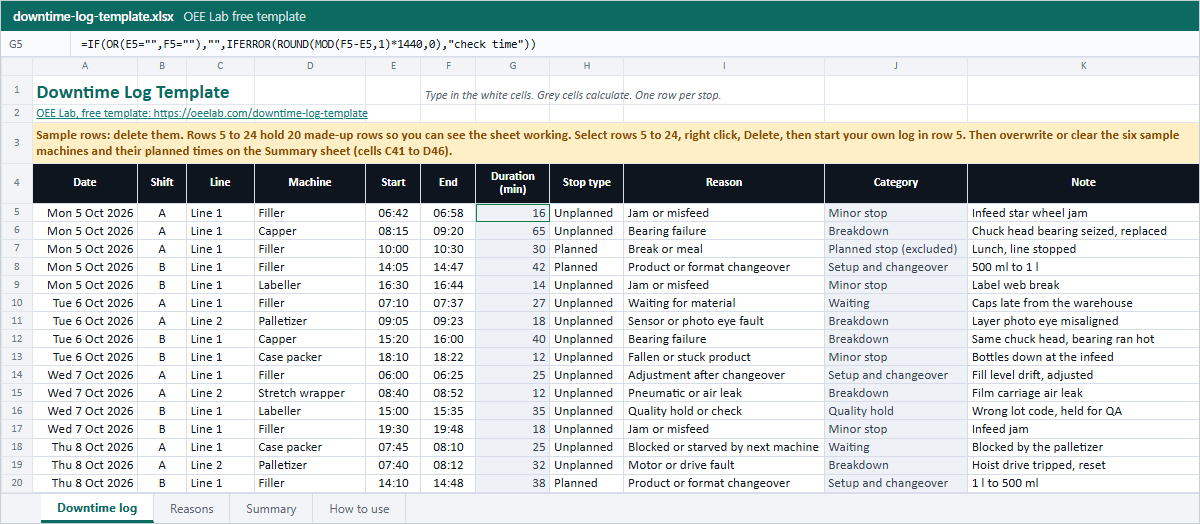 Downtime logDate, shift, line, machine, start, end, planned or unplanned, reason and note. Duration and category fill in by themselves.
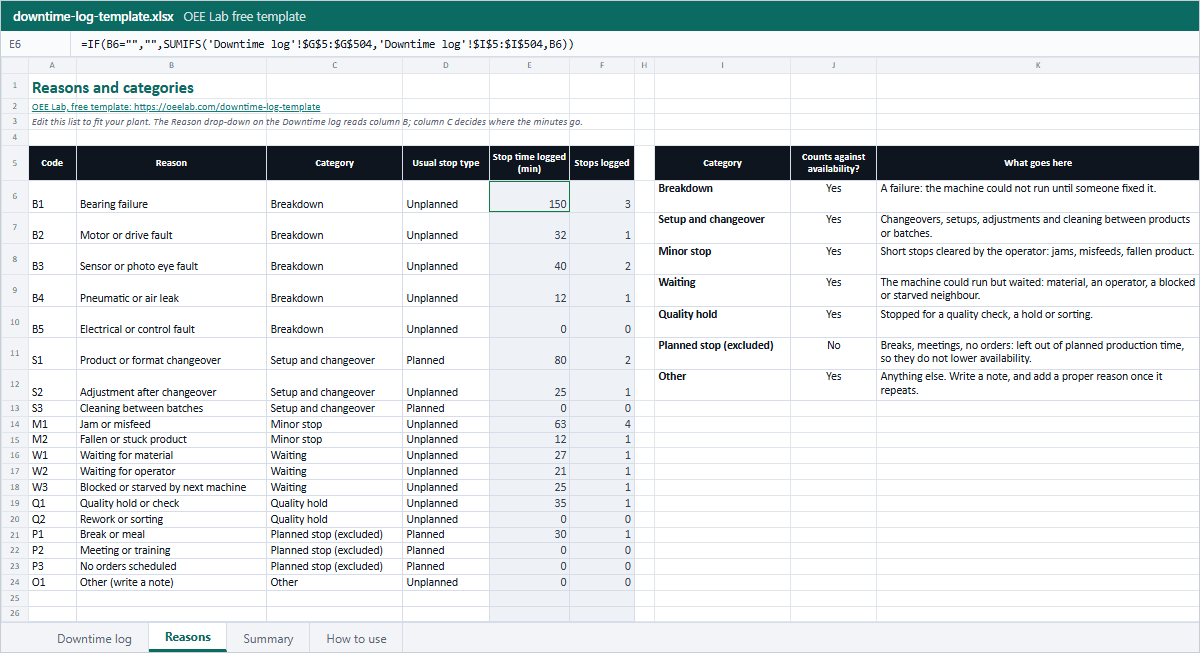 Reasons19 reason codes in 7 categories, with the usual stop type and the minutes and stops logged against each. Add your own in the empty rows.
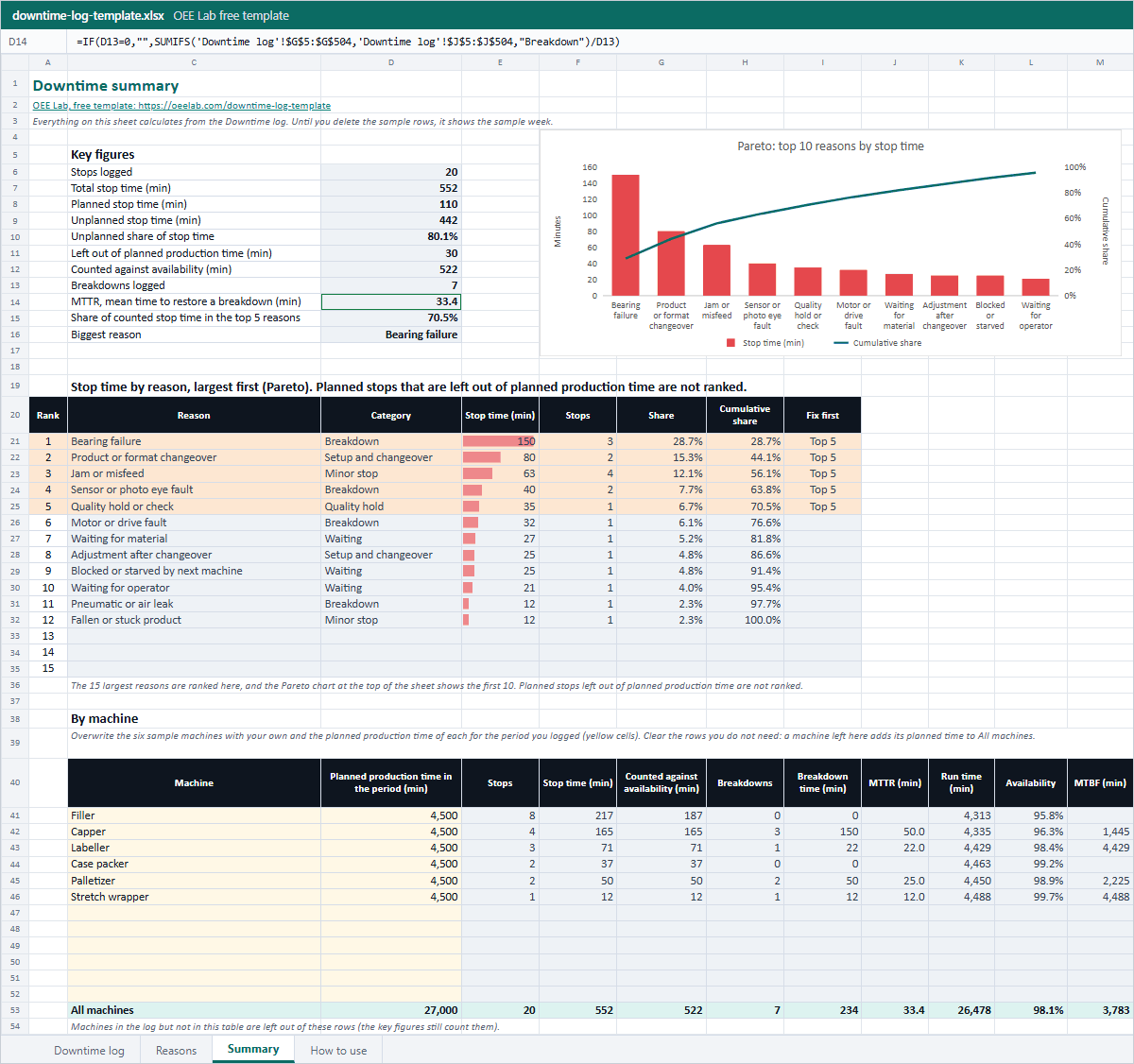 SummaryStop time by reason, largest first, with the top 5 and a Pareto chart. Stops, MTTR, MTBF and availability per machine.
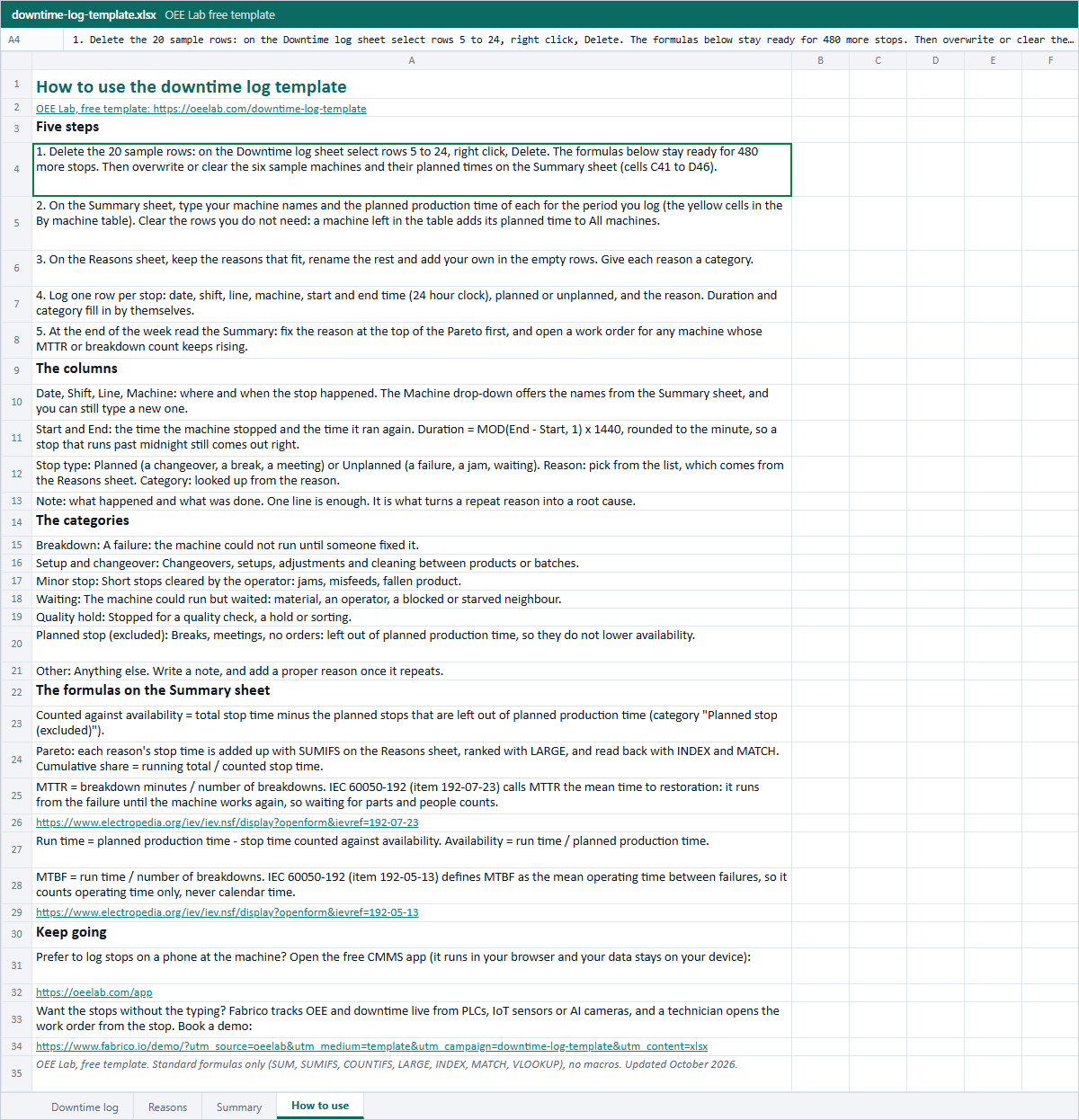 How to useThe five steps, what goes in each column and every formula, with its source.
Or fill it in here
One row per stop. Pick a reason from the list and the category and the usual stop type follow; type start and end and the minutes follow. Your log is saved in this browser only; the stops you type are not sent to us.
Your stops
Change any field and the results above follow. A new stop goes at the end.
| Date | Shift | Machine | Start | End | Minutes | Stop type | Reason | Category | |
|---|---|---|---|---|---|---|---|---|---|
| Total stop time | - | ||||||||
Stop time by reason (Pareto)
Largest first, with the running share. Breaks and other stops left out of planned production time are not ranked.
By machine
Stops, minutes and breakdowns per machine.
By category
Want help setting this up on your line?
Leave your work email if you would like the OEE Lab team to get in touch. To keep your log, download the Excel file or the CSV above.
No newsletter, no spam.
Rather log stops on a phone than on a clipboard?
The free OEE Lab app logs each shift and every stop with its reason, works out your OEE and a downtime Pareto, and runs in your browser, on a phone at the line or on the office PC. Work orders and PM plans are built in for the repair side.
Open the free OEE appA clipboard only sees the stops someone writes down.
The one-minute jams and the waits nobody thinks of as a stop are the first to be left off the form. Fabrico, a light MES, tracks OEE and downtime live from PLCs, IoT sensors or AI cameras. Where cameras are fitted, the video of a stop sits next to its machine data, and a technician opens the work order from the stop. Data hosted in the AWS EU region; ISO 27001, ISO 9001 and ISO/IEC 20000-1.
Book a Fabrico demoHow to use the downtime log template
- Delete the sample rows. On the Downtime log sheet select rows 5 to 24, right click and pick Delete. The formulas below them stay ready for 480 more stops. The six sample machines on the Summary sheet (cells C41 to D46) stay until you overwrite or clear them in step 2.
- Name your machines. On the Summary sheet, overwrite the sample machines in the yellow cells of the By machine table with each of your machines and its planned production time for the period you log, and clear the rows you do not need. A sample machine left in the table adds its planned time to All machines. The Machine drop-down on the log reads that list.
- Fix your reason list. On the Reasons sheet keep the reasons that fit, rename the rest and add your own in the empty rows, each with a category. A short, fixed list is what makes the Pareto worth reading.
- Log every stop when it happens. Date, shift, line, machine, the time it stopped, the time it ran again, planned or unplanned, the reason and one line of note. A stop written down at the machine keeps its real reason; one rebuilt at the end of the shift tends to become "other".
- Read the Summary once a week. Work on the reason at the top of the Pareto first, and open a work order for any machine whose breakdowns or MTTR keep climbing.
No computer at the line? Print the PDF log form, keep it on a clipboard at the machine and type the week into the workbook on Friday. The reason codes on the form are the same as on the Reasons sheet.
What goes in each column
| Column | What to write | Example |
|---|---|---|
| Date, Shift | The day and the shift the stop started in | Mon 5 Oct 2026, A |
| Line, Machine | Where it happened, as specific as the fix needs to be | Line 1, Capper |
| Start, End | When it stopped and when it ran again, 24 hour clock | 08:15, 09:20 |
| Duration (min) | Calculated, do not type | 65 |
| Stop type | Planned or Unplanned, from the drop-down | Unplanned |
| Reason | From the drop-down, which reads the Reasons sheet | Bearing failure |
| Category | Looked up from the reason, do not type | Breakdown |
| Note | What happened and what was done, one line | Chuck head bearing seized, replaced |
The formulas behind the Summary sheet
Duration (min) = MOD(End - Start, 1) × 1440
Excel stores a time as a fraction of a day, so the difference times 1,440 gives minutes, and MOD keeps a stop that runs past midnight positive (23:50 to 00:35 gives 45).
MTTR = breakdown minutes ÷ number of breakdowns
The IEC vocabulary calls this the mean time to restoration and marks "mean time to repair" as deprecated (IEC 60050-192, item 192-07-23). It runs from the failure until the machine works again, so waiting for a technician or a part is part of it. That is also what the log measures, from Start to End.
Availability = run time ÷ planned production time
Run time is the planned production time you type for each machine minus its stop time that counts against availability. Stops in the category "Planned stop (excluded)", such as breaks and time with no orders, are left out because they are not part of planned production time. More on this in the availability calculator.
MTBF = run time ÷ number of breakdowns
IEC defines MTBF as the mean operating time between failures (item 192-05-13), so it counts run time, never calendar time. Check single numbers with the MTBF and MTTR calculator.
The Pareto adds up each reason's minutes with SUMIFS on the Reasons sheet, ranks them with LARGE and reads them back in order with INDEX and MATCH, so it re-sorts itself as you log. The running share is the running total divided by all stop time that counts against availability.
A worked example
The ten stops the log above opens with, Monday 5 Oct to Wednesday morning in the sample week of the workbook:
| Step | Calculation | Result |
|---|---|---|
| Capper stop on Monday | 08:15 to 09:20 | 65 min |
| Total stop time, 10 stops | 16 + 65 + 30 + 42 + 14 + 27 + 18 + 40 + 12 + 25 | 289 min |
| Counted against availability | 289 - 30 (lunch break) | 259 min |
| Top reason: bearing failure | (65 + 40) ÷ 259 | 40.5% |
| Capper MTTR | 105 min ÷ 2 breakdowns | 52.5 min |
| Capper availability, 4 shifts of 450 min | (1,800 - 105) ÷ 1,800 | 94.2% |
| Capper MTBF | 1,695 min ÷ 2 | 847.5 min |
Two bearing failures on the same chuck head in two days is the line that matters here, not the total. In the full sample week it happens a third time, and bearing failure ends up as 150 of the 522 minutes that count, 28.7%: a job for a work order and a root cause analysis, not for the next shift.
Planned or unplanned, counted or not
Every stop answers two separate questions. The first is whether it was planned: a changeover is, a jam is not. The second is whether it happened inside planned production time: a lunch break with the line stopped is outside it, a changeover is inside it. The template keeps them apart. Stop type records the first question, and the category "Planned stop (excluded)" records the second, so the Summary can show the unplanned share and still work out availability the way OEE does. The guide to planned vs unplanned downtime goes through the edge cases.
Common mistakes
- Free text reasons. "Jam", "jammed" and "infeed jam" become three short bars instead of one long one. Pick from the list and add to the list.
- Logging only the long stops. A log that starts at 10 minutes misses the short ones that add up; set one threshold for everyone and write it on the form.
- Writing the shift total at the end of the shift. A total tells you that time was lost, not where or why.
- Counting breaks against availability on one line and not on another. Decide once which stops are left out of planned production time.
- Calling the time to the technician's arrival "repair time" and leaving the waiting out. MTTR runs until the machine works again.
- Never reading the Pareto. The log pays off only when the top reason gets an owner and a date.
To put a money figure on the minutes, use the downtime cost calculator. To turn them into OEE, use the OEE tracking template, which takes the same breakdown and changeover minutes per shift.
Downtime log FAQ
What should a downtime log template include?
One row per stop with the date, shift, line, machine, the time it stopped and the time it ran again, whether the stop was planned or unplanned, a reason from a fixed list and a short note. The duration and the category can then be worked out for you, which is what this template does.
How do I calculate downtime minutes in Excel?
Type the start and end as times and use =MOD(End-Start,1)*1440. MOD keeps the result positive when a stop runs past midnight, and 1440 turns a fraction of a day into minutes. The Duration column of the template already holds this formula.
What is the difference between planned and unplanned downtime?
Planned downtime is scheduled in advance, such as changeovers, breaks and meetings. Unplanned downtime is everything that was not, such as failures, jams and waiting for material. For OEE a second question matters more: did the stop happen inside planned production time? Breaks and time with no orders are left out of it, while changeovers count as lost time even though they are planned.
How do I make a downtime Pareto chart in Excel?
Add up the minutes for each reason with SUMIFS, sort the reasons from largest to smallest and add a running total as a share of the stop time that counts against availability. Then insert a column chart of the minutes with the running share as a line on a second axis. The Summary sheet of this template does all of it with formulas, so the chart updates as you log.
How do I calculate MTTR and MTBF from a downtime log?
MTTR is the total breakdown time divided by the number of breakdowns. MTBF is the run time divided by the number of breakdowns, where run time is the planned production time minus the stop time that counts against availability. The Summary sheet works out both for every machine once you type in its planned production time.
Should I log short stops?
Log the ones you can, with a reason. Studies of Swedish plants found speed and short-stop losses to be the largest category, and that most of them go unrecorded (Ljungberg 1998; Hedman et al. 2016). If writing each one down is not practical, tally them per shift, or measure them from the machine signal.
Related: how to track downtime · micro-stops · the six big losses · reducing unplanned downtime