Maintenance Work Order Template for Manufacturing Equipment
A free maintenance work order form for machines and plant equipment. Fill it in below, print it or save it as a PDF or CSV, or download the Excel version with a work order log and the Word form. No signup, and what you type stays in your browser.
Updated October 2026
Keep every work order in one place, free.
OEE Lab's free CMMS and OEE app runs in your browser. Work orders are called Tasks there: the button opens a new task with the machine, problem, cause and work from this form already filled in. Your data stays on your device.
Create this as a task in the free CMMSDowntime tracked live, not written down after the shift.
Fabrico, a light MES, tracks OEE and downtime live from PLCs, IoT sensors or AI cameras, and a technician opens the work order from the stop. Where cameras are fitted, the video of a stop sits next to its machine data.
Book a Fabrico demoWhat goes on a maintenance work order
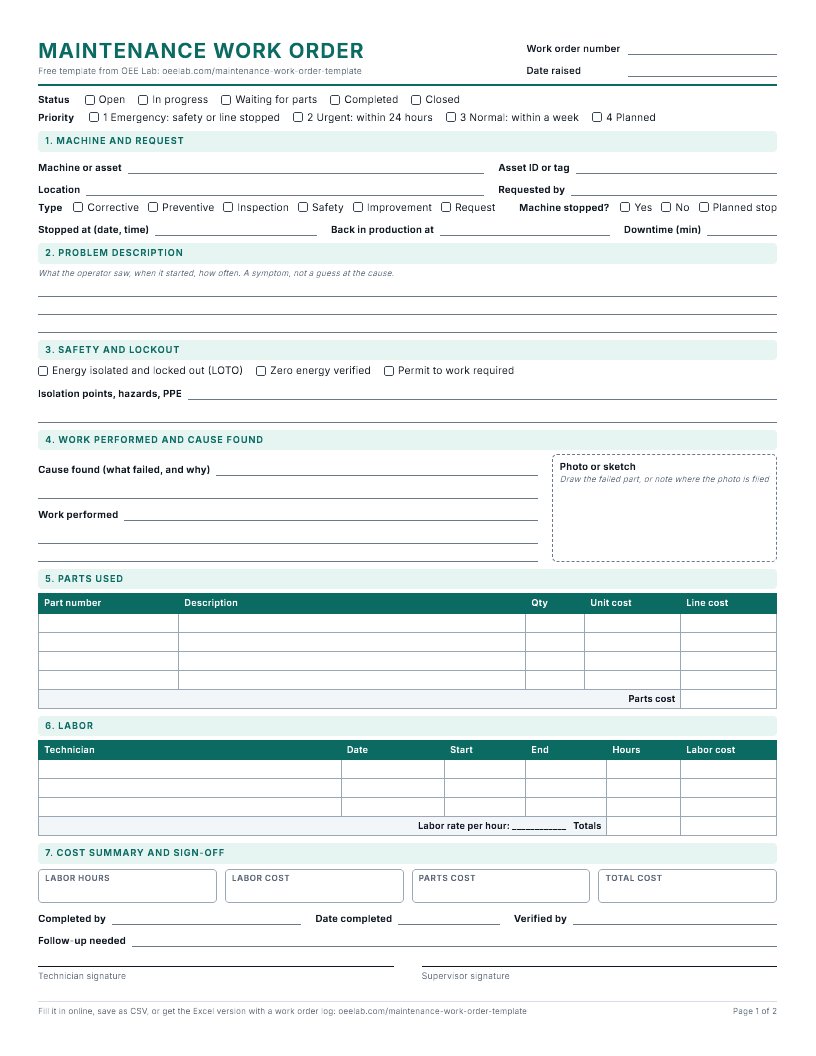
A maintenance work order is the instruction to do one job on one machine, and afterwards the record that it was done. Each field is there because the technician needs it to work safely, or because someone needs it later to see what the machine cost and why it failed.
| Field | Why it is there |
|---|---|
| Work order number and date | One number per job, so nothing is fixed twice or forgotten. |
| Requested by | Who saw the problem, so the technician can ask what happened before the stop. |
| Machine, asset ID, location | The exact machine, not "the packer on line 3". The asset ID lets a log add up cost and downtime per machine. |
| Priority | How fast it has to be done. Four levels are enough; if everything is urgent, nothing is. |
| Type | Corrective, preventive, inspection, safety, improvement or request. The split shows how much work was planned. |
| Stopped at, back in production at | The downtime the job caused, from the moment the machine stopped until it ran again. |
| Problem description | What the operator saw, when it started and how often. A symptom, not a guess at the cause. |
| Safety and lockout | Energy sources isolated and locked, zero energy verified, permit or not, and the hazards of the job. |
| Cause found and work performed | What actually failed, and what was done about it. The cause is the field that stops the same breakdown coming back. |
| Photo or sketch | A photo of the failed part or a quick drawing. The PDF and Word forms have a box for it. |
| Parts used | Part number, quantity and unit cost, so parts cost is counted and the storeroom can reorder. |
| Labor | Who worked on it, from when to when. Hours times the labor rate gives the labor cost. |
| Sign-off | Who did it, who checked the machine runs, and any follow-up job. |
Two of these fields are worth more than they look. Record when the machine stopped and when it was back in production, not only the hands-on repair time: IEC 60050-192 defines MTTR as mean time to restoration, which includes waiting for a technician and for parts; the labor lines hold the hands-on time. And keep the type: in a NIST survey of US discrete manufacturers (2016 data), unplanned downtime took 7.8% of planned production time and 45.7% of machinery maintenance was reactive. A log with type and downtime on every order is how a plant finds out where its own numbers sit.
How to use this template
- Raise it. Whoever finds the problem fills in the machine, priority, type and what they saw, on a printed form at the line or on this page on a phone.
- Plan it. The planner checks the priority, names the technician and notes the lockout points and parts.
- Do it. The technician locks out, ticks the safety checks, does the work and writes down the cause, the parts and the times.
- Close it. The operator or shift lead checks that the machine runs and signs off. A temporary fix gets a follow-up.
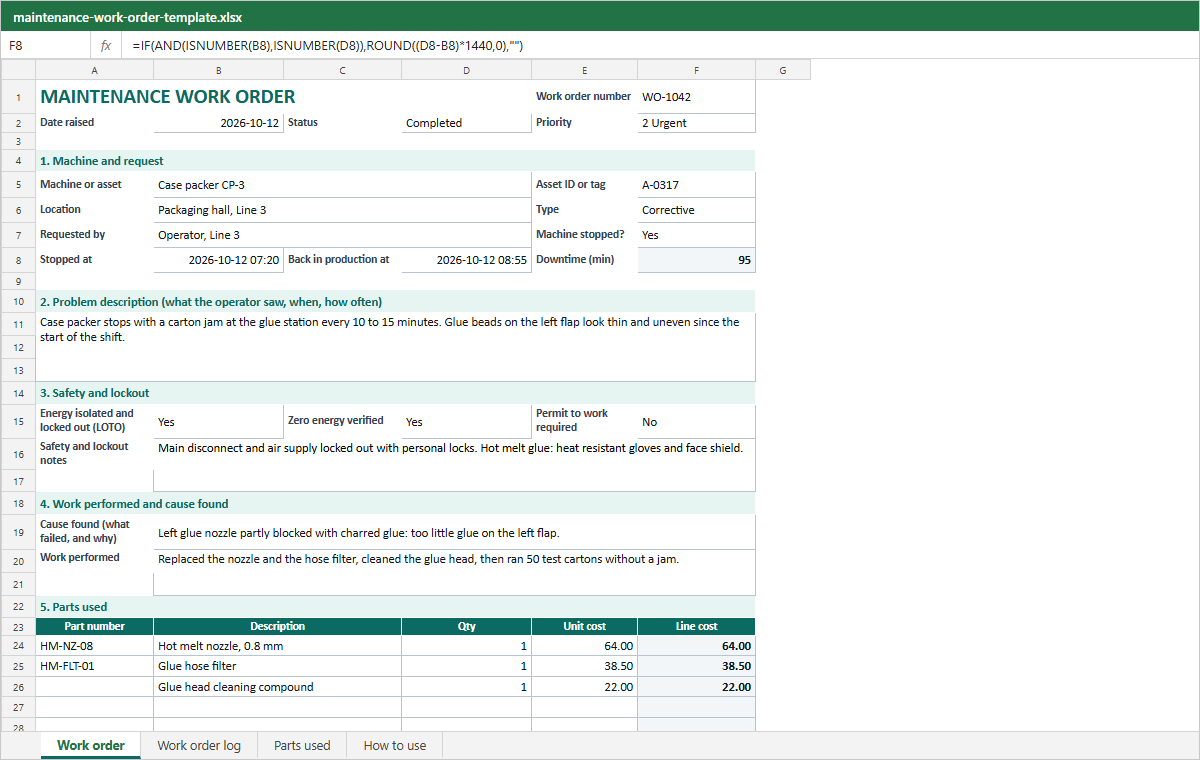
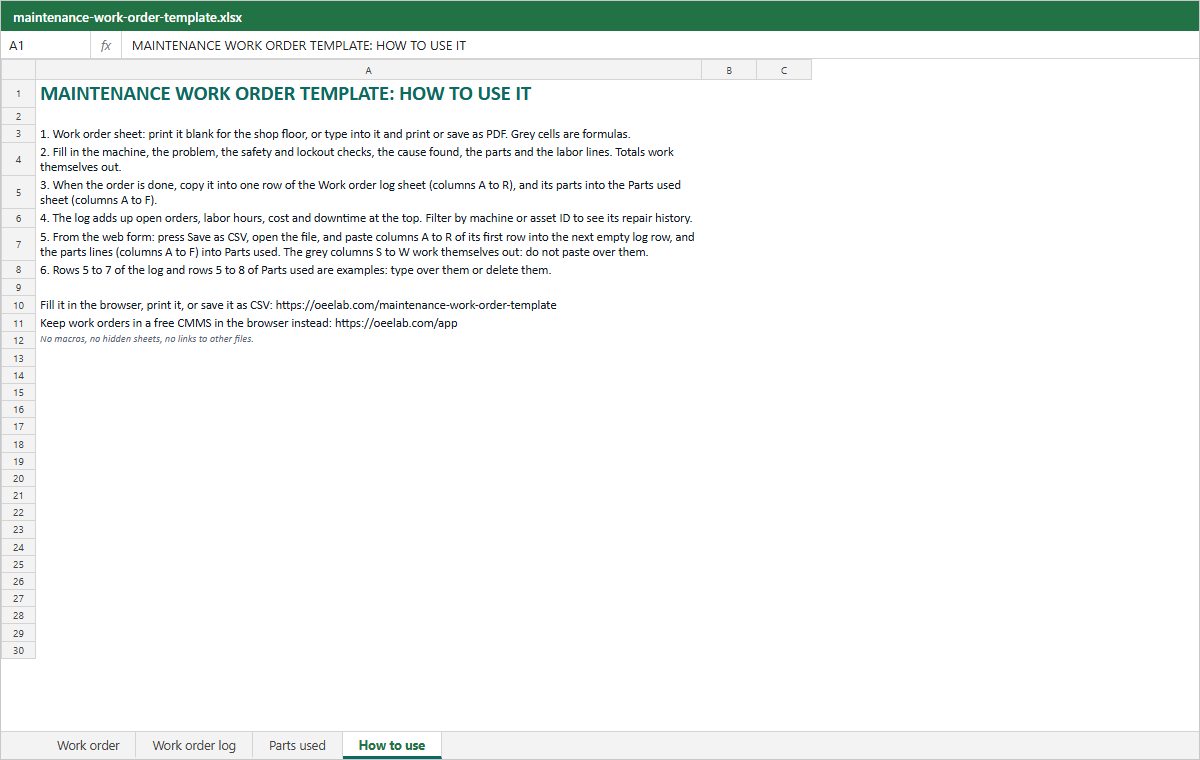
- Log it. Copy the order into the Work order log sheet of the Excel file, or press Save as CSV and paste columns A to R of its first row into the next empty log row; the grey columns S to W work themselves out. The log adds up open orders, labor hours, cost and downtime; filter one machine or asset ID to see its repair history.
Download the template
Excel (.xlsx)
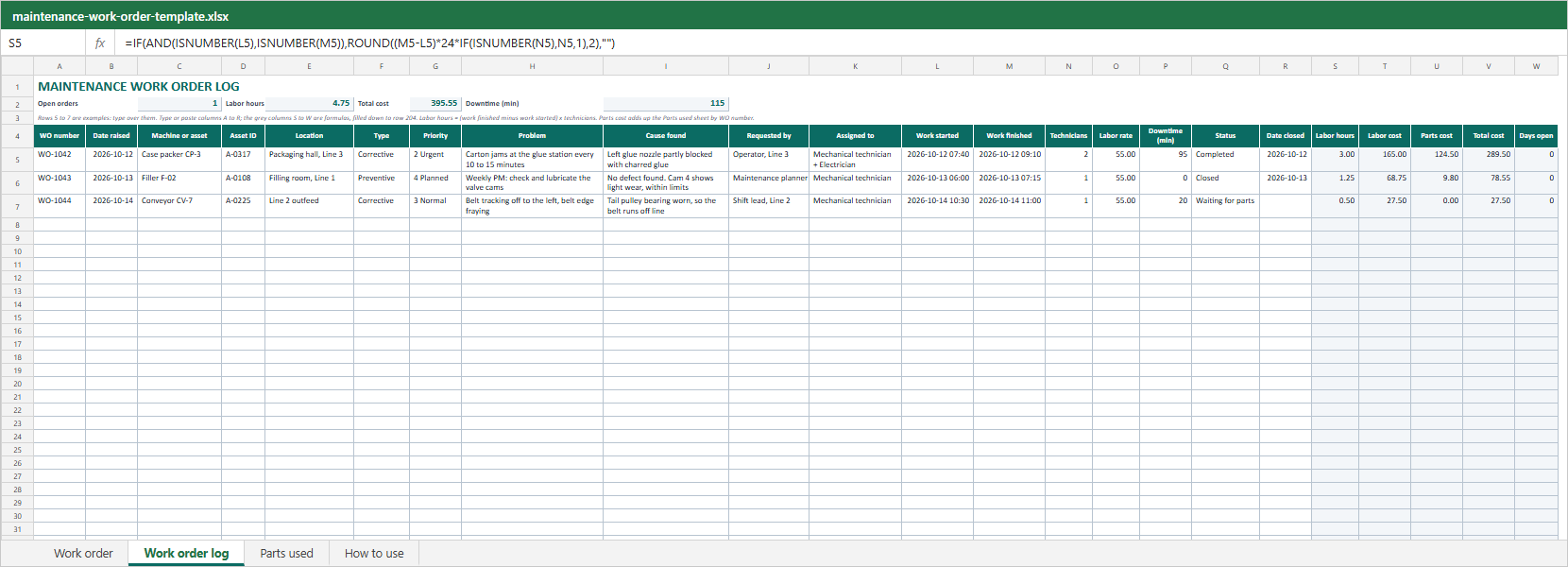
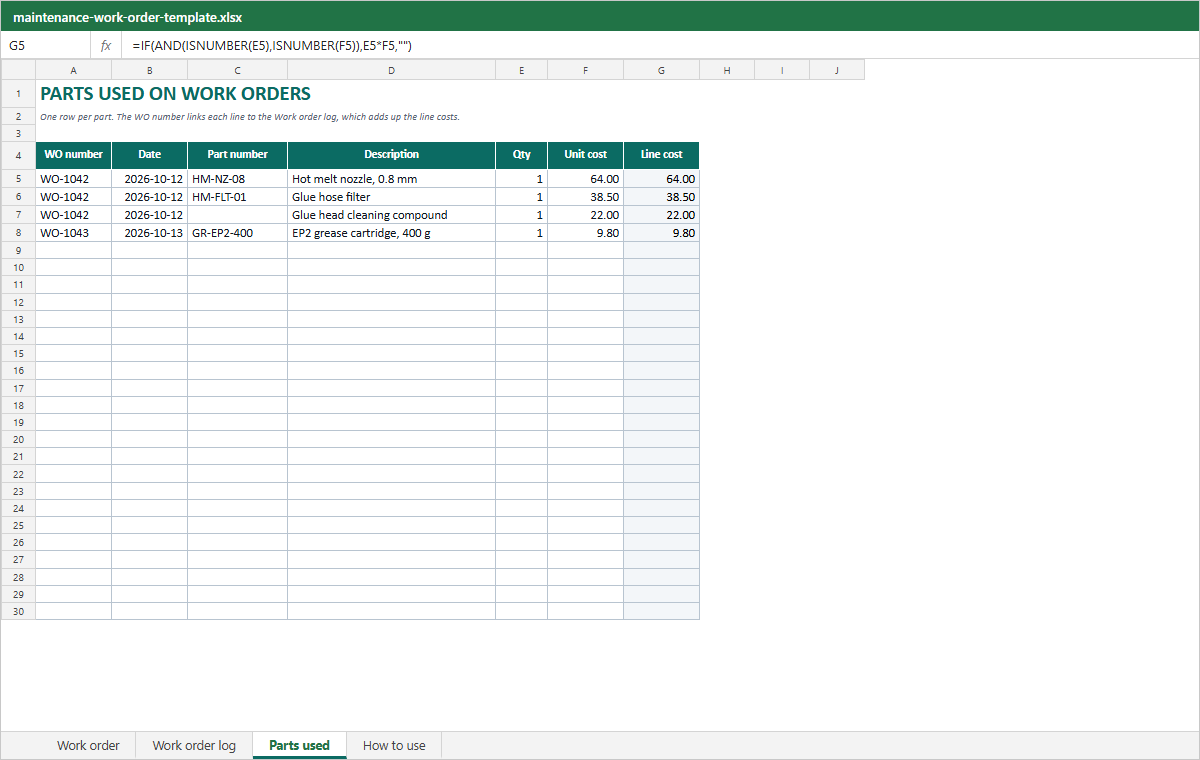
A Work order sheet that works out downtime, labor and totals, a Work order log, a Parts used sheet and a How to use sheet. No macros.
Word (.docx)
The same one page form, ready to edit: add your logo or rename a field.
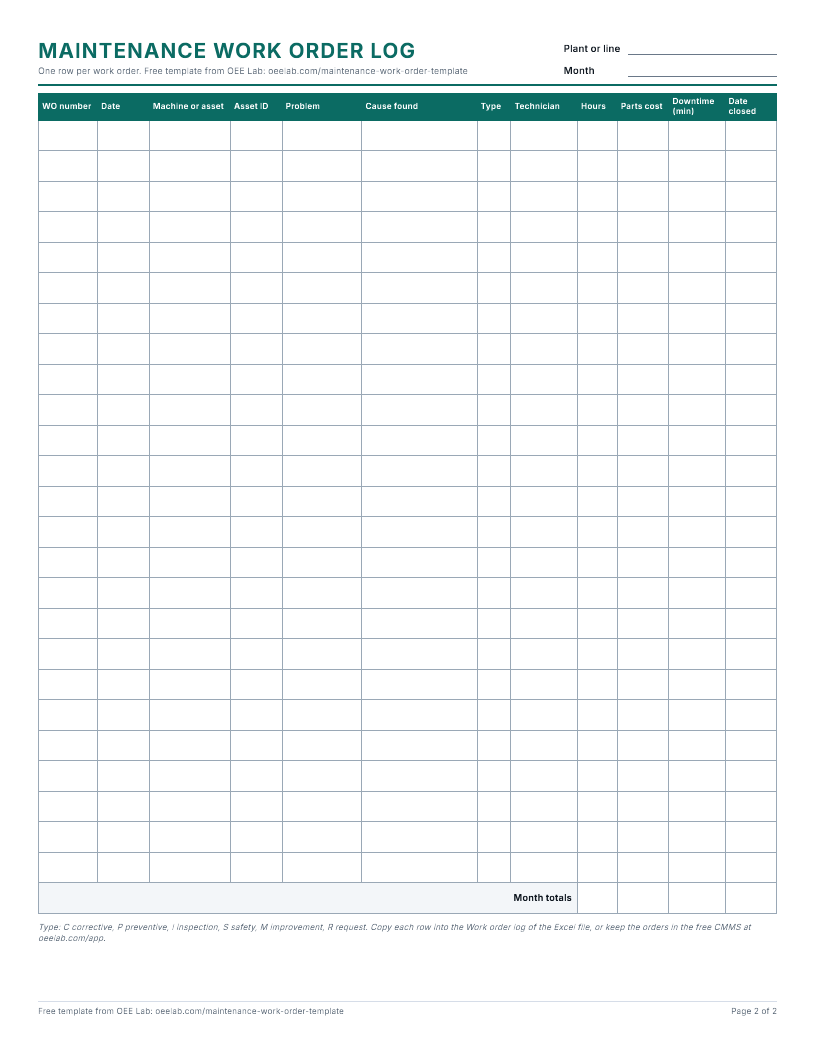
The form on one Letter page to fill in by hand, plus a paper log for the month.
What each sheet looks like
Common mistakes
- Writing a cause instead of a symptom. "Sensor fault" is a guess; "stops every 10 minutes with a jam at the glue station" is something a technician can check.
- Leaving "cause found" empty. Without it the log shows that a machine broke, never why.
- Logging only the repair time. The stop starts when the machine stops, not when the technician arrives.
- Making every order urgent. Keep Emergency for safety and stopped lines.
- One work order for several machines. Split it, or cost and downtime land on the wrong asset.
- Skipping the lockout section on a quick job.
- Closing the order without a sign-off from someone who saw the machine run.
When a spreadsheet stops being enough
A paper form and an Excel log work well for one line and a few people. They start to slip when nobody can tell which orders are open, when several technicians share one file, or when the person who asked for a repair has to walk to the office to ask if it is done. For the first, open the free CMMS app: every order, its status and each machine's repair history in one place, on one shared computer or tablet (it does not sync between devices). When the orders have to reach every technician and the people on the line, that is where Fabrico comes in, with data hosted in the AWS EU region. Book a Fabrico demo to see it on your own machines.
Maintenance work order FAQ
What should a maintenance work order include?
At minimum: a work order number, the date, who requested it, the machine and its location, the priority and type, a description of the problem, the safety and lockout steps, the cause found and the work done, the parts used, the labor time and a sign-off. This template has all of them.
What is an example of a maintenance work order?
The form on this page opens with one: WO-1042 on case packer CP-3, cartons jamming at the glue station, the machine down for 95 minutes, a blocked glue nozzle and filter replaced, 3 labor hours and 124.50 in parts. Choose it under Load an example to bring it back after you clear the form.
Is there an Excel version of this maintenance work order template?
Yes. The .xlsx file has a printable work order sheet with formulas for downtime, line costs, labor hours and totals, a Work order log sheet with one row per order, and a Parts used sheet that the log adds up by work order number. It has no macros. The same form is also here as a Word file and a PDF.
What are the different types of maintenance work orders?
This form uses six: corrective, preventive, inspection, safety, improvement and request. Inspection, safety and improvement orders keep checks, hazards and small upgrades on the record instead of in a notebook. A request is a job someone has asked for that nobody has planned yet.
What is the difference between a corrective and a preventive maintenance work order?
A corrective work order fixes something that has failed or is about to fail, and usually starts from a request. A preventive work order comes from a schedule, such as a weekly lubrication or an inspection, before anything fails. Use the Type field so the log can show how much of your work is planned.
How does a maintenance request work?
Whoever sees the problem raises a request with the machine, what they saw and how urgent it is. The planner checks it, sets the priority and assigns a technician, and it becomes a work order; if no work is needed, it is closed with a note. Choose Maintenance request under Load an example to see one.
What is the difference between a work order and a purchase order?
A work order tells someone to do a job and records the labor, parts and result. A purchase order tells a supplier to deliver goods or services at an agreed price. A maintenance job can need both: the work order for the repair and a purchase order for a part that is not in stock.
Who signs off a maintenance work order?
The technician who did the work signs that it is complete, and a supervisor, shift lead or the operator signs that the machine runs as it should. Two names keep a job from being closed on paper while the machine is still down.
Related: free work order software · preventive maintenance checklist · downtime log template · how to calculate MTTR