OEE Tracking Template
A free OEE tracking template for Excel, for the clipboard and for your browser. Log each shift's planned time, stops and counts; the workbook works out availability, performance, quality and OEE for every shift, adds up each week and splits the lost time into the six big losses. No signup, no email.
Updated October 2026
Download the template
Standard formulas only (SUM, SUMIFS, COUNTIFS, SUMPRODUCT), no macros, nothing to enable. Free to use and change.
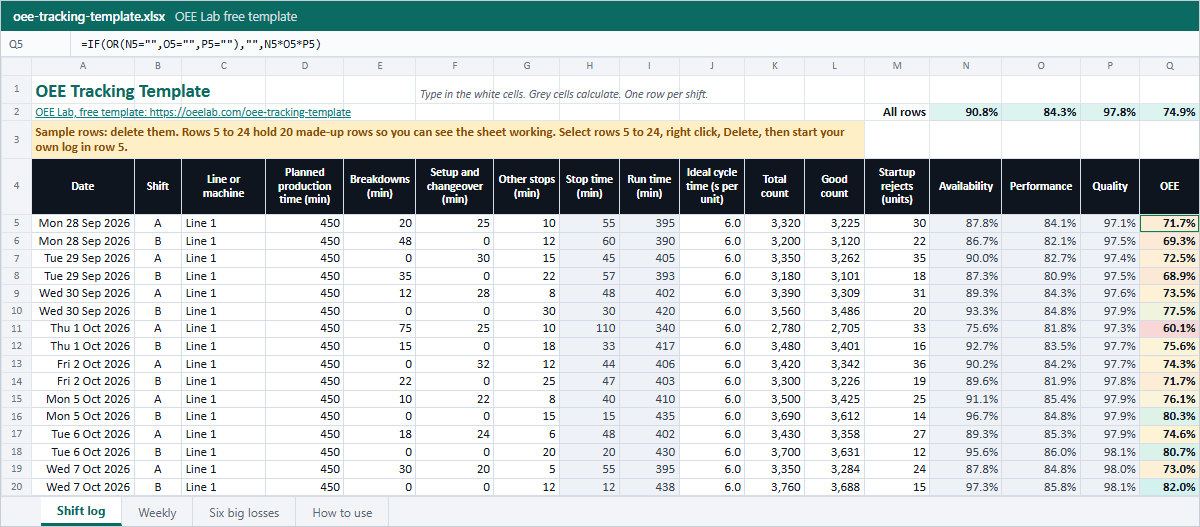 Shift logPlanned time, three kinds of stop, ideal cycle, total, good and startup rejects. Run time, A, P, Q and OEE per row.
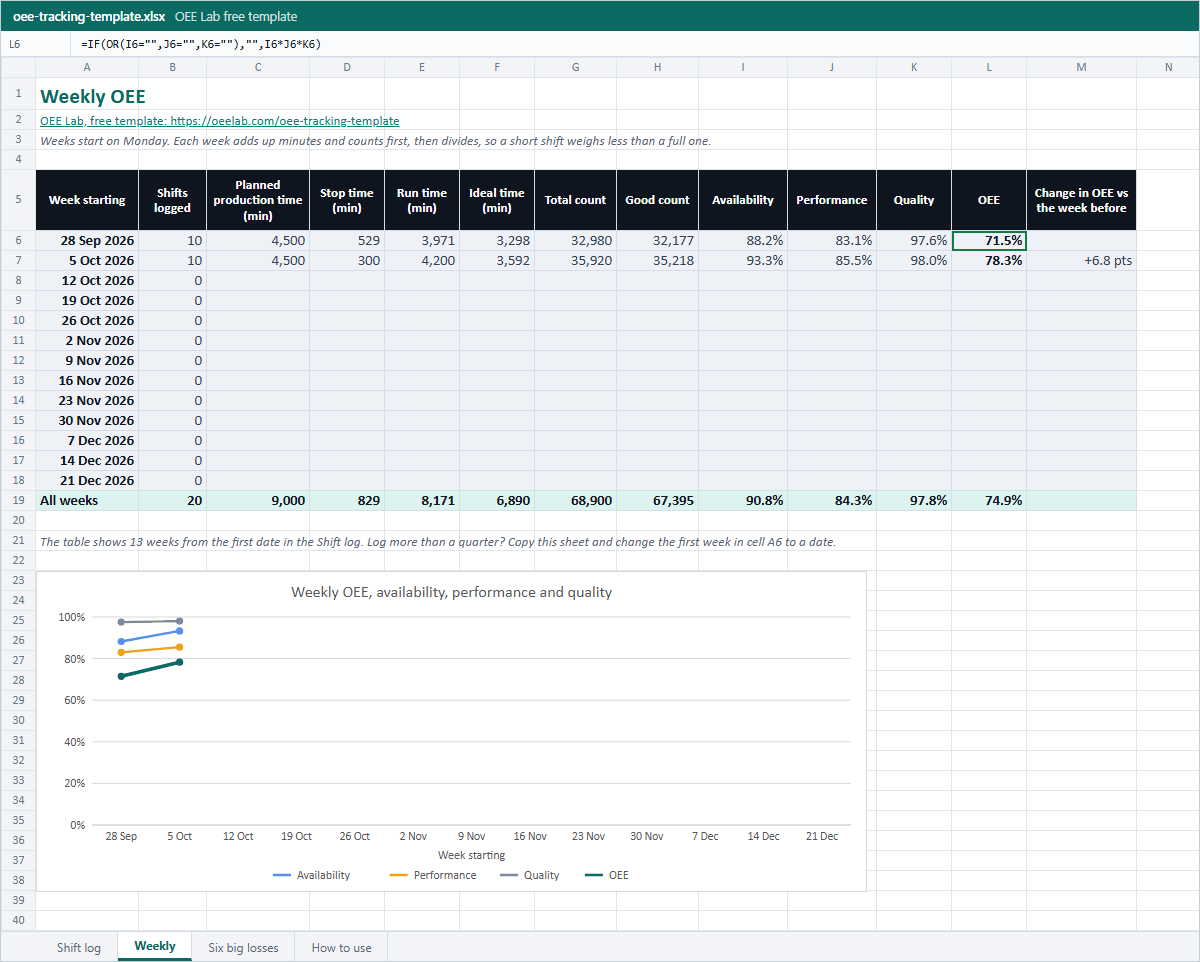 Weekly13 weeks from your first date, added up with SUMIFS, the change in OEE from week to week and a trend chart.
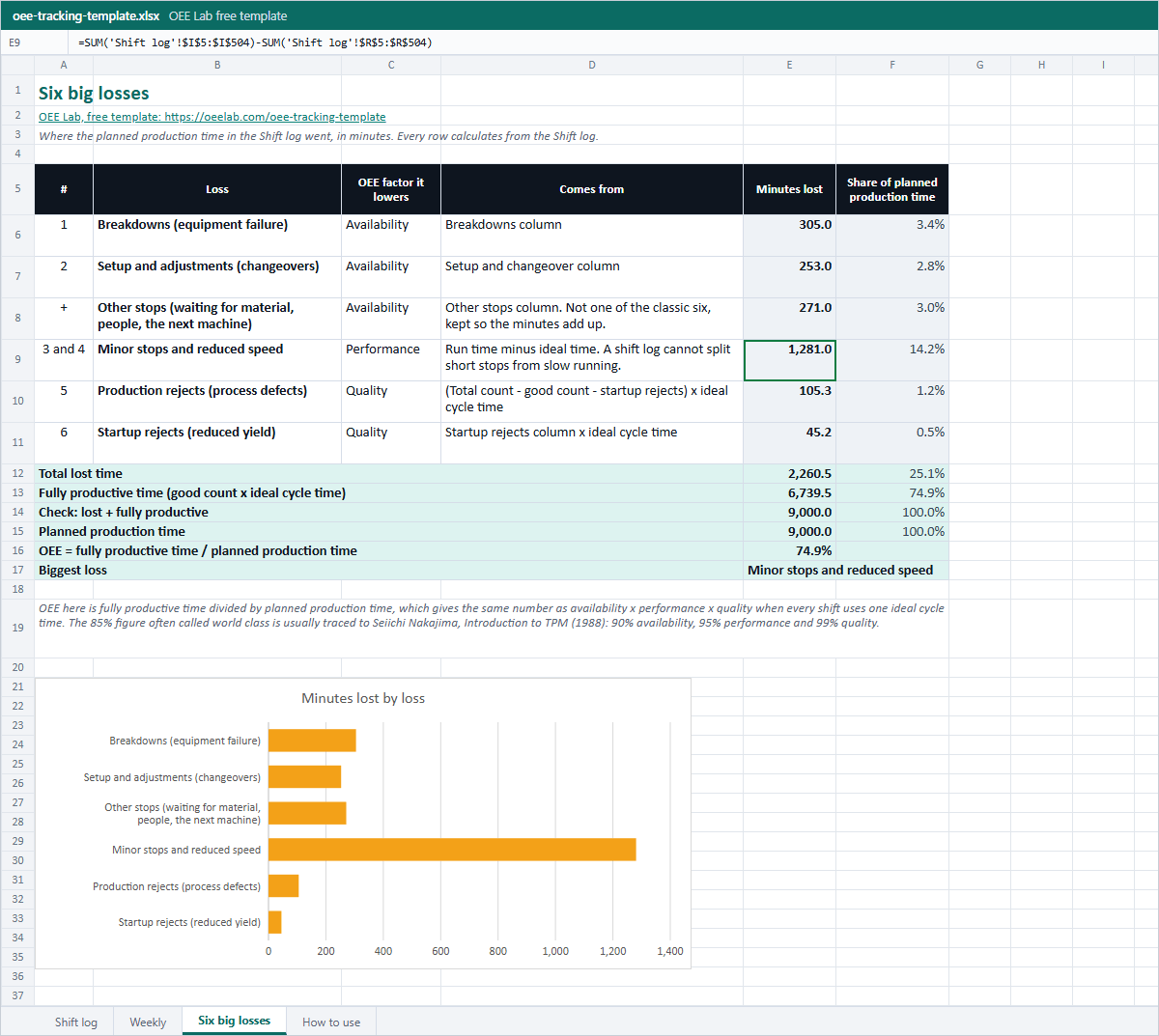 Six big lossesWhere the planned time went, in minutes, from breakdowns to startup rejects, with the biggest loss named and a bar chart.
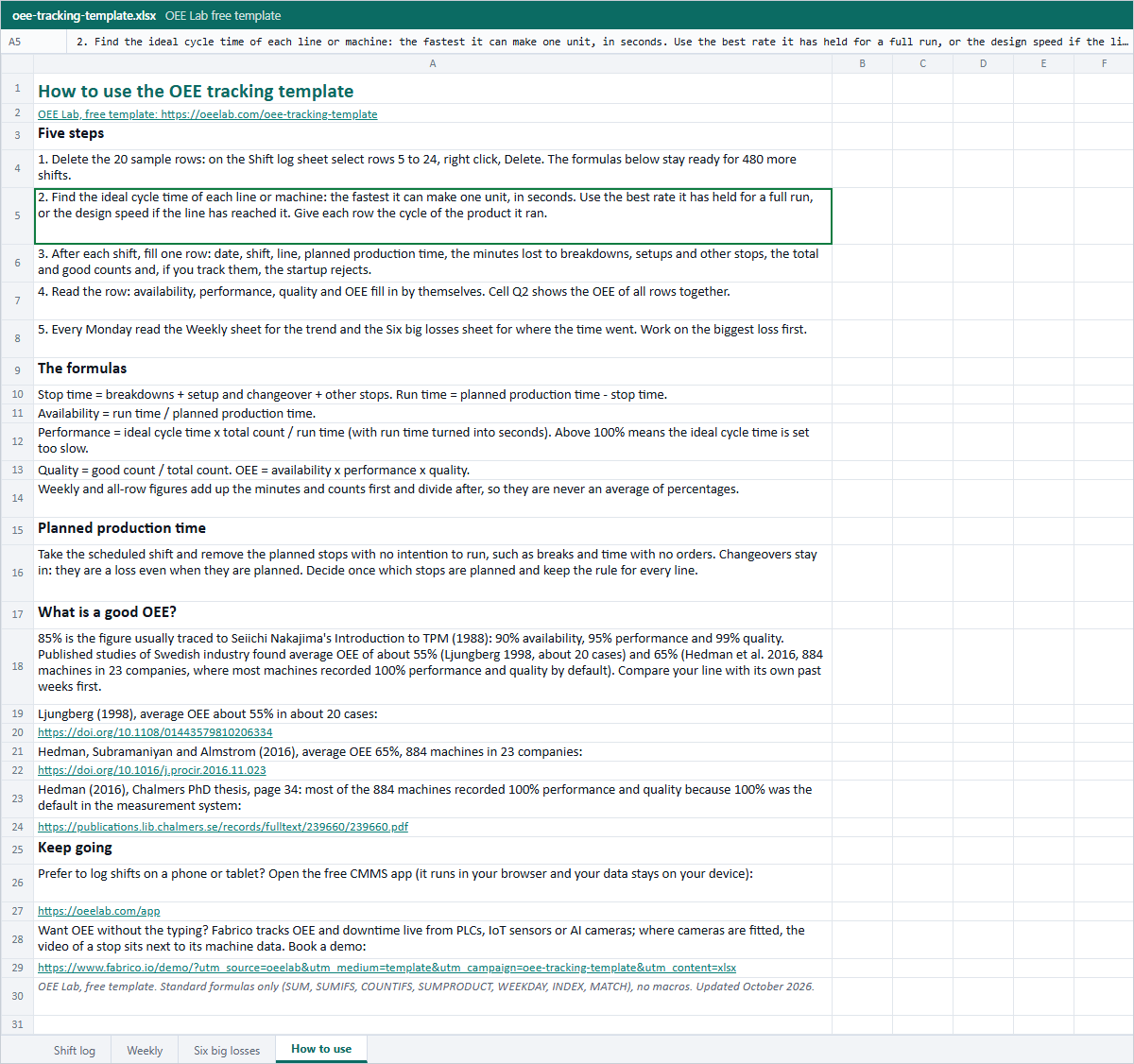 How to useThe five steps, the formulas, planned production time and what a good OEE is, with sources.
Or fill it in here
One row per shift. Ideal cycle time is the fastest the machine can make one unit, in seconds. Your log is saved in this browser only; the numbers you type are not sent to us.
Your shifts
Change any field and the results above follow. A new shift goes at the end.
| Shift | Planned time (min) | Breakdowns (min) | Setup, changeover (min) | Other stops (min) | Ideal cycle (s/unit) | Total count | Good count | Availability | Performance | Quality | OEE | |
|---|---|---|---|---|---|---|---|---|---|---|---|---|
| All shifts | - | - | - | - | - | - | - | - | ||||
Where the planned production time went
Want help setting this up on your line?
Leave your work email if you would like the OEE Lab team to get in touch. To keep your log, download the Excel file or the CSV above.
No newsletter, no spam.
Tired of retyping the shift sheet?
The free OEE Lab app logs each shift and every stop with its reason, works out your OEE and a downtime Pareto, and runs in your browser, on a phone at the line or on the office PC. Work orders and PM plans are built in for the repair side.
Open the free OEE appA spreadsheet tells you the OEE. It cannot show you the stop.
Fabrico, a light MES, tracks OEE and downtime live from PLCs, IoT sensors or AI cameras. Where cameras are fitted, the video of a stop sits next to its machine data, and a technician opens the work order from the stop. Data hosted in the AWS EU region; ISO 27001, ISO 9001 and ISO/IEC 20000-1.
Book a Fabrico demoHow to use the OEE tracking template
- Delete the sample rows. On the Shift log sheet select rows 5 to 24, right click and pick Delete. The formulas below them stay ready for 480 more shifts.
- Find the ideal cycle time of each line or machine: the fastest it can make one unit, in seconds. Use the best rate it has held for a full run, or the design speed if the line has reached it.
- Fill one row after every shift: date, shift, line, planned production time, the minutes lost to breakdowns, to setups and changeovers and to other stops, the total count, the good count and, if you count them, the startup rejects.
- Read the row. Stop time, run time, availability, performance, quality and OEE fill in by themselves, and row 2 shows the OEE of all rows together.
- Every Monday, read the Weekly sheet for the trend and the Six big losses sheet for where the time went. Work on the biggest loss first.
No computer at the line? Print the PDF shift log, fill it in on the floor and type the week in on Friday. It has 15 rows, five days of up to three shifts, a column for each row's ideal cycle time and the formulas at the bottom.
The OEE formulas in the template
Run time = planned production time - stop time
Availability = run time ÷ planned production time
Performance = ideal cycle time × total count ÷ (run time × 60)
Quality = good count ÷ total count
OEE = availability × performance × quality
The ideal cycle time is in seconds and run time in minutes, hence the 60. OEE comes from the total productive maintenance work of Seiichi Nakajima in the 1980s (Muchiri and Pintelon, 2008), and research uses the same split: availability counts the stops, performance the speed losses and short stops, quality the rejects (Hedman, Chalmers PhD thesis, 2016). Planned production time is the scheduled time minus breaks and time with no orders; changeovers stay in it, because they are a loss even when they are planned. Check one shift with the OEE calculator, or one factor with the availability calculator.
A worked example
The first row of the sample, Monday A shift on Line 1:
| Step | Calculation | Result |
|---|---|---|
| Stop time | 20 + 25 + 10 | 55 min |
| Run time | 450 - 55 | 395 min |
| Availability | 395 ÷ 450 | 87.8% |
| Performance | 6 × 3,320 ÷ (395 × 60) | 84.1% |
| Quality | 3,225 ÷ 3,320 | 97.1% |
| OEE | 0.878 × 0.841 × 0.971 | 71.7% |
The same answer comes from the other direction: 3,225 good units at 6 seconds each is 322.5 minutes of fully productive time, and 322.5 ÷ 450 = 71.7%. The Six big losses sheet uses that second view to show where the other 127.5 minutes went.
Weekly OEE: add the minutes, not the percentages
Say one shift ran 450 minutes at 80% OEE and a short Saturday shift ran 120 minutes at 40%. The average of the two percentages is 60%. But the line made 360 + 48 = 408 minutes of fully productive time out of 570 planned, which is 71.6%. The Weekly sheet adds up planned time, stop time, run time, ideal time and counts for each week with SUMIFS on the week start date, then divides, so every week is weighted by the time the line actually had. In the sample the week of 28 September comes out at 71.5% and the week of 5 October at 78.3%, a gain of 6.8 points.
The six big losses, from the same rows
The Six big losses sheet needs nothing extra: it maps the columns you already fill to the losses that lower each OEE factor. With the 20 sample shifts:
| Loss, and where it comes from | Lowers | Sample, min |
|---|---|---|
| 1. Breakdowns Breakdowns column | Availability | 305 |
| 2. Setup and adjustments Setup and changeover column | Availability | 253 |
| Other stops (waiting, material, people) Other stops column | Availability | 271 |
| 3 and 4. Minor stops and reduced speed Run time minus ideal time | Performance | 1,281 |
| 5. Production rejects Rejects minus startup rejects, times ideal cycle | Quality | 105.3 |
| 6. Startup rejects Startup rejects times ideal cycle | Quality | 45.2 |
| Fully productive time Good count times ideal cycle | 6,739.5 | |
| Planned production time | 9,000 |
In the sample the biggest loss is not a breakdown but speed: 1,281 minutes, more than the three stop columns together. A shift log cannot say how much of that is short stops and how much slow running, because both only show up as a lower performance. "Other stops" is not one of the classic six; it is kept on its own so the minutes add up to the planned time. The six big losses guide explains each one and the six big losses calculator works on a single period.
What is a good OEE?
85% is the figure usually traced to Seiichi Nakajima's Introduction to TPM (1988): 90% availability, 95% performance and 99% quality. The two published studies we could check sit well below it. Both measured Swedish plants and found average OEE of about 55% (Ljungberg 1998, about 20 cases) and 65% (Hedman et al. 2016, 884 machines in 23 companies). The second figure flatters: 702 of the 884 machines recorded 100% performance and 796 recorded 100% quality, because 100% was the default in the measurement system (Hedman 2016, page 34), so it mostly counts stops. Compare a line with its own past weeks before you compare it with anyone else.
Common mistakes
- An ideal cycle time that is too slow. Performance above 100% is the giveaway; a design speed the line has never reached is the other extreme.
- Counting breaks as stops on one line and leaving them out on another. Decide once what planned production time means and keep it.
- Leaving changeovers out of stop time because they were planned. They are an availability loss.
- Averaging shift OEE percentages for the week instead of adding up the minutes.
- Counting reworked units as good. Quality counts what was right the first time.
- One ideal cycle time for products that run at different speeds. Give each row the cycle of the product it ran.
Logging the stops one by one? The downtime log template gives the breakdown and changeover minutes per shift that go into this sheet, plus a Pareto of the reasons.
OEE tracking template FAQ
What should an OEE tracking template include?
For each shift: the planned production time, the minutes lost to stops, the ideal cycle time, the total count and the good count. From those five inputs availability, performance, quality and OEE are worked out per shift, per week and for the whole period.
How do I calculate OEE in Excel?
Put run time in its own column as planned production time minus stop time. Then availability is =RunTime/PlannedTime, performance is =IdealCycle*TotalCount/(RunTime*60) with the cycle in seconds, quality is =Good/Total, and OEE is the three multiplied. The Shift log sheet holds these formulas for 500 shifts.
How do I track OEE by week?
Add up the minutes and counts of every shift in the week first, then work out availability, performance and quality from the sums and multiply them. An average of shift percentages gives a short shift the same weight as a full one. The Weekly sheet does this with SUMIFS on the week start date.
Why is my performance above 100%?
The ideal cycle time is set slower than the machine really runs, or the total count includes units made outside the shift. Set the ideal cycle time to the best rate the machine has held for a full run, or its design speed if it has reached it, and performance stays at or below 100%.
What are the six big losses in OEE?
Breakdowns and setups lower availability, minor stops and reduced speed lower performance, and production rejects and startup rejects lower quality. The Six big losses sheet turns the shift log into minutes for each, so you can see which one to work on first.
Is a manual OEE log accurate enough?
It is accurate enough to find your biggest loss and to follow a trend, as long as everyone uses the same rules. Its blind spot is short stops: studies of Swedish plants found speed and short-stop losses to be the largest category, and that most of them go unrecorded (Ljungberg 1998; Hedman et al. 2016). In a shift log they show up only as lower performance.
Related: what OEE is · availability, performance and quality · how to improve OEE · OEE vs TEEP