Maintenance KPI Tracker Template for Plant Maintenance Teams
Type one month of hours, failures, PM tasks, backlog and cost below and see its maintenance KPIs. Download the Excel tracker to keep 12 months: it works out MTBF, MTTR, PM compliance, planned maintenance, backlog in crew weeks and cost against replacement asset value, and charts them on a dashboard sheet. No signup, no macros.
Updated October 2026
One month
One machine, line or area. What to count in each box
Failures
Preventive maintenance
Maintenance labor
Cost
Keep this month, or track all twelve
Save this month as a CSV row that pastes into the Excel tracker, or download the tracker itself: 12 months, a dashboard sheet with six charts, and the definitions.
MTBF and MTTR follow IEC 60050-192 (IEV 192-05-13 and 192-07-23). The red line is SMRP's figure for top performers, under 3% of RAV (SMRP Best Practices Metrics Workshop, 2018). No other KPI here has a sourced target, so compare it with its own trend. The look first line checks, in this order: numbers that cannot be right, a waiting share above half of each stop, cost above 3% of RAV, then PM tasks not done on time.
Want a second look at these numbers?
Leave your work email if you would like the OEE Lab team to get in touch about your maintenance KPIs. To keep the result, use Copy link or Print above, or download the Excel tracker.
No newsletter, no spam.
A monthly tracker shows the trend, not the stop behind it.
Fabrico, a light MES, tracks OEE and downtime live from PLCs, IoT sensors or AI cameras, and a technician opens the work order from the stop. Where cameras are fitted, the video of a stop sits next to its machine data, with AI-suggested likely causes the team validates.
Book a Fabrico demoDownload the maintenance KPI tracker
Excel (.xlsx)
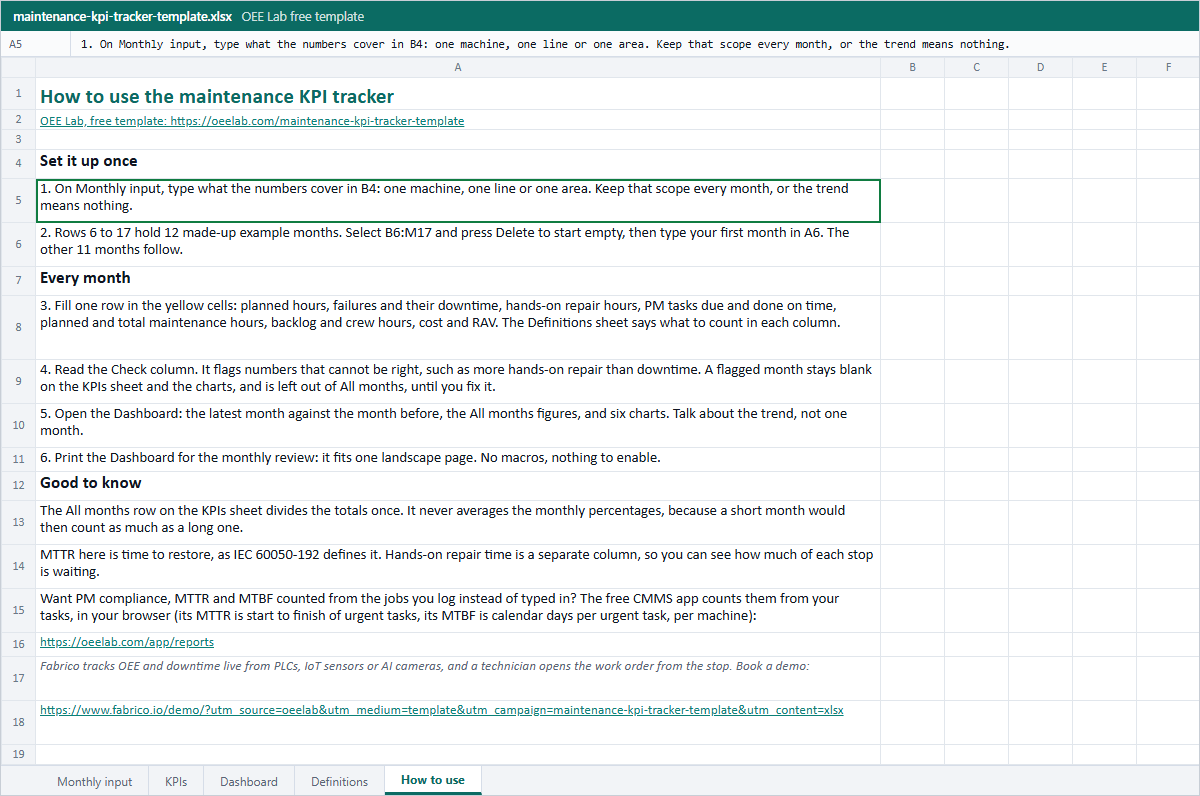
Five sheets: Monthly input, KPIs, a Dashboard with six native charts, Definitions and How to use. A formula in every KPI cell, 12 example months to type over, no macros.
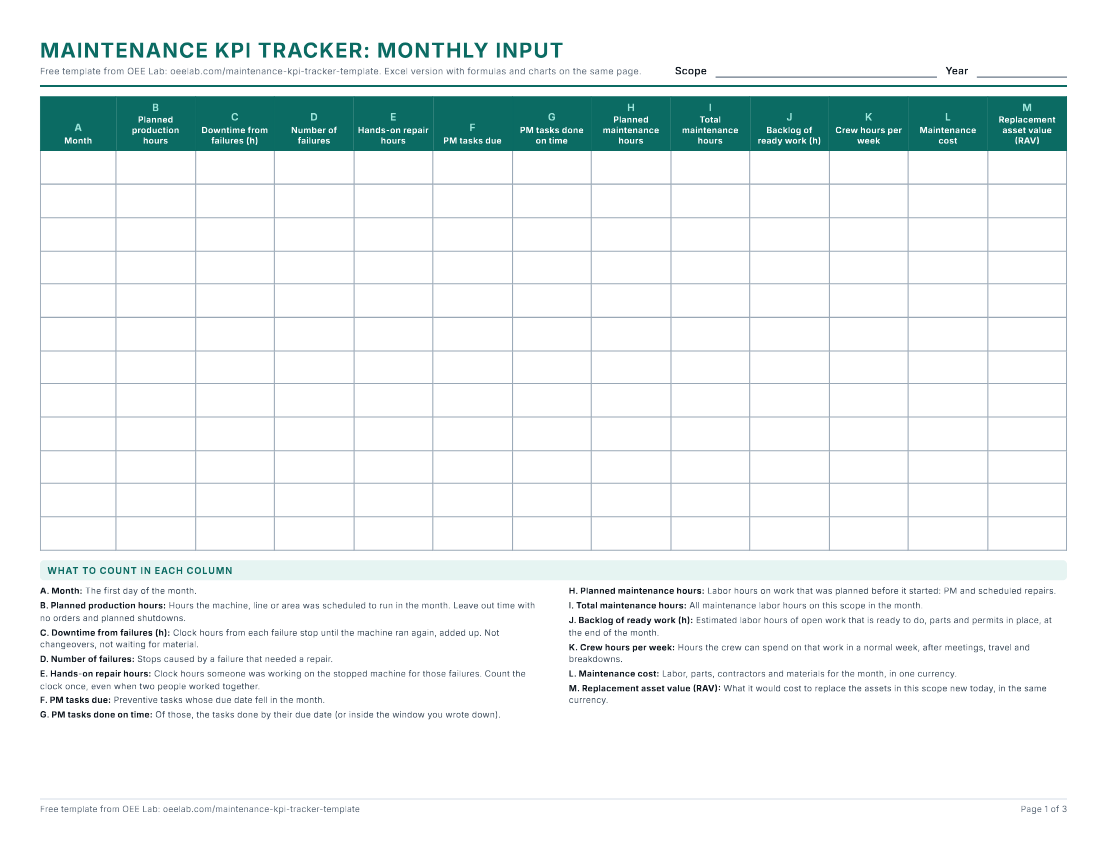
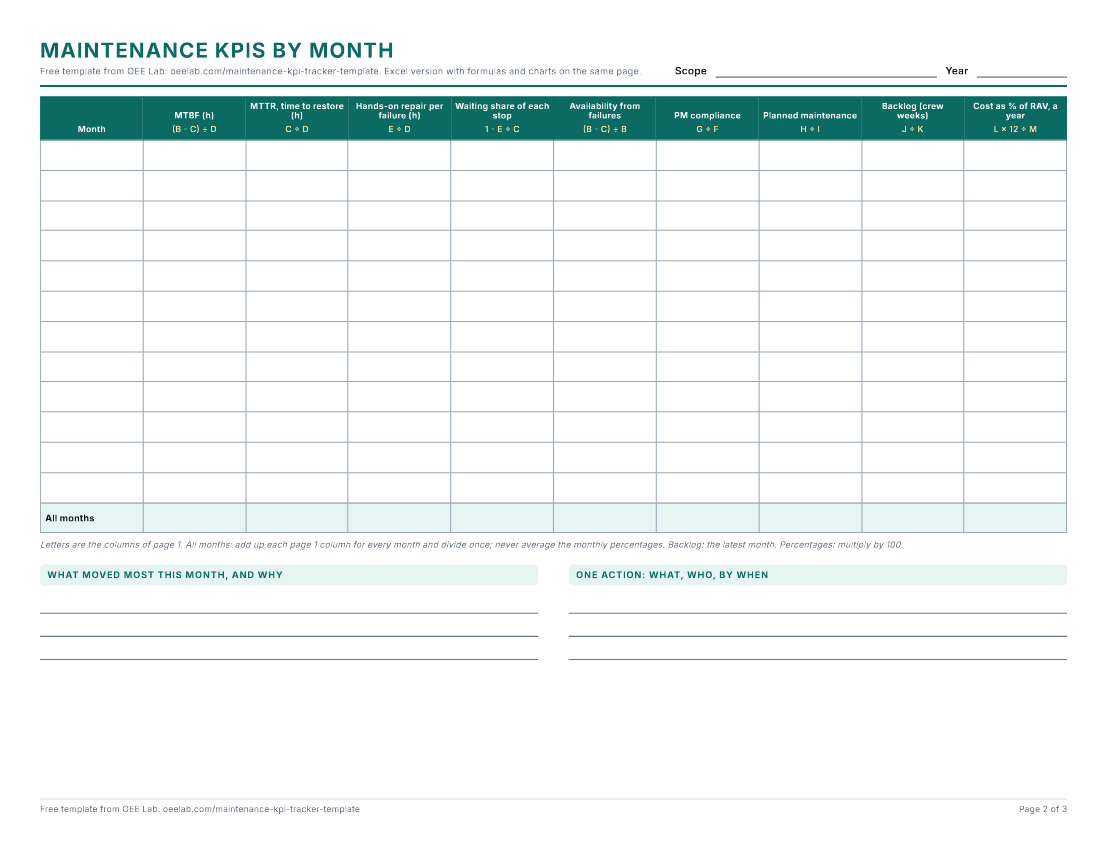
Three pages to fill in by hand: the monthly log, the KPIs with their formulas, and the definitions.
In the browser
The tracker at the top: one month, then copy the link, print it or save it as a CSV row for the Excel file.
What each sheet looks like
How to use the tracker
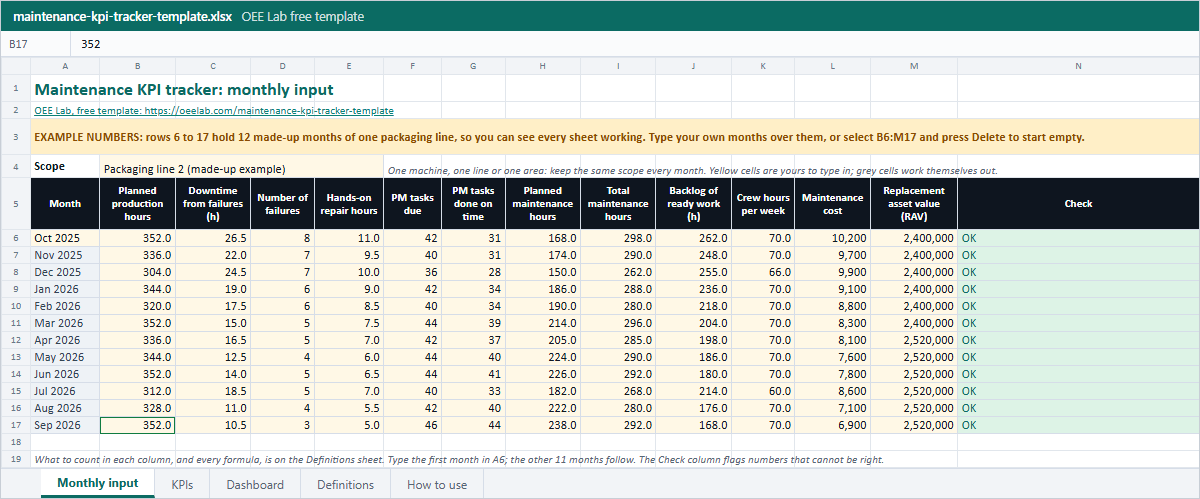
- Open it. Rows 6 to 17 of the Monthly input sheet hold 12 made-up months of one packaging line, so every sheet shows numbers from the start.
- Set the scope. Type what the numbers cover in B4: one machine, one line or one area. Keep that scope every month, or the trend means nothing.
- Clear the example. Select B6:M17 and press Delete, then type your first month in A6. The other 11 months follow.
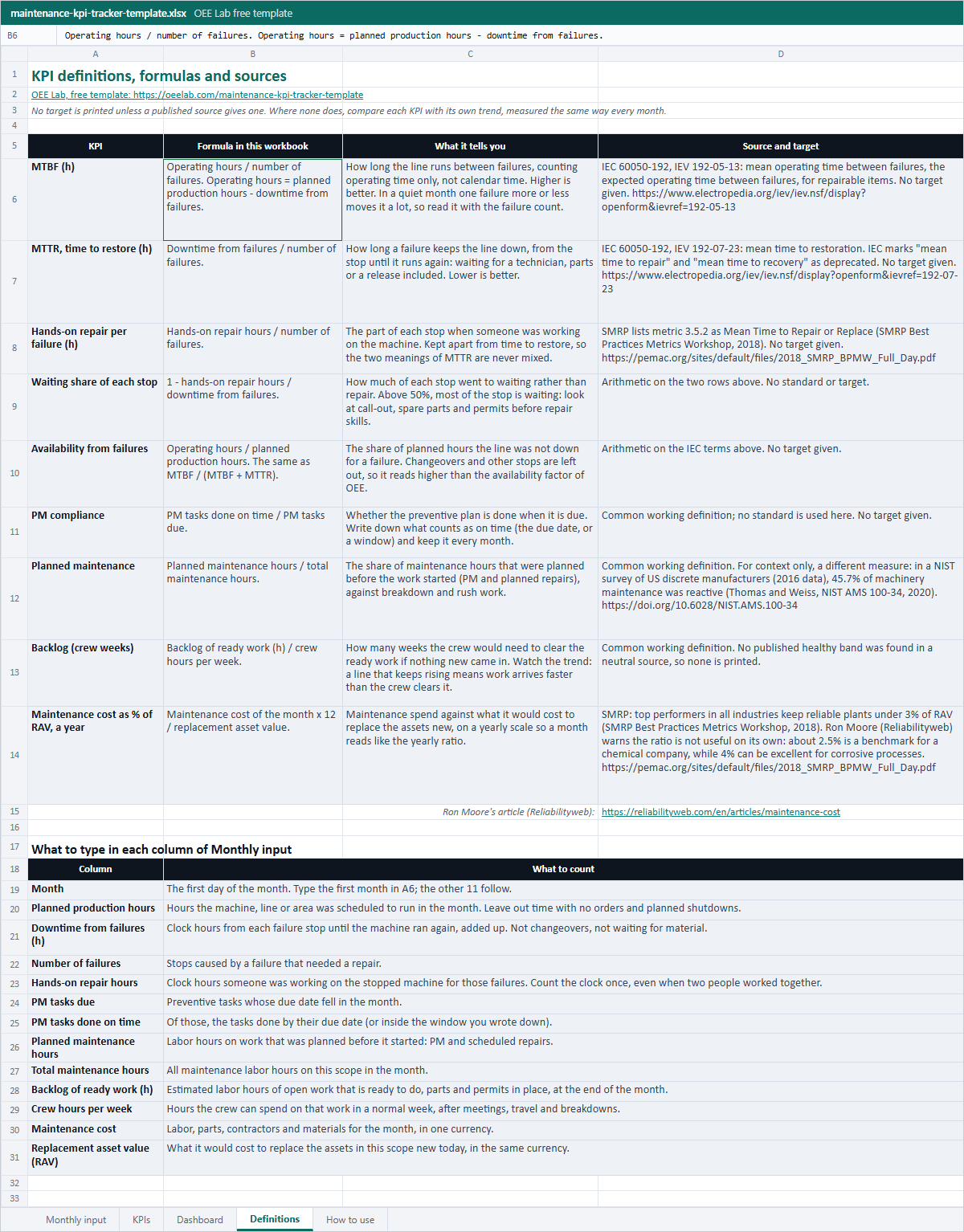
- Fill one row a month. Type the yellow cells at each month end. The Definitions sheet says what to count in each column, and the Check column flags numbers that cannot be right, such as more hands-on repair than downtime. To try a month first, type it in the tracker above and press Download CSV: its row has the same columns, B to M.
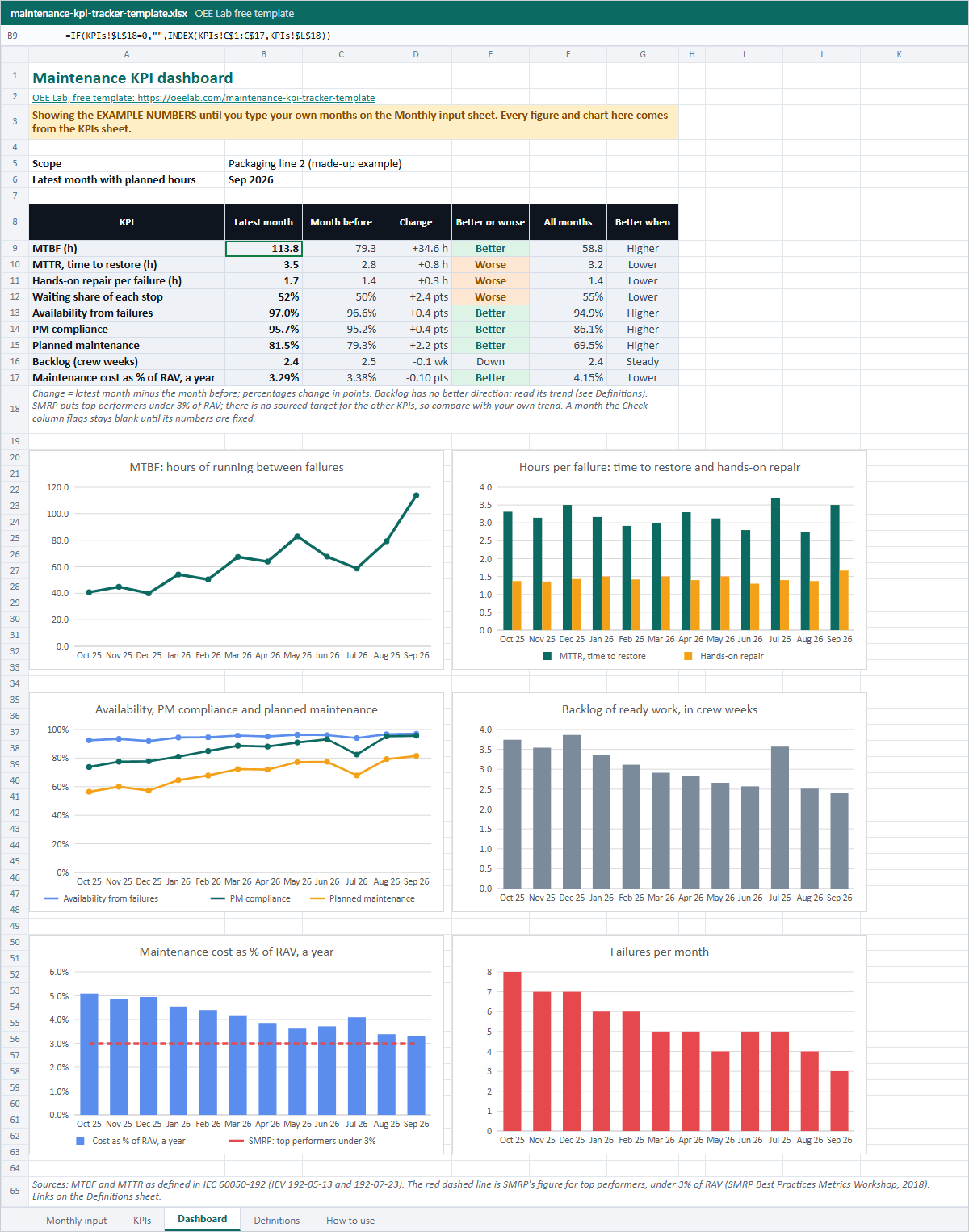
- Review the dashboard. The Dashboard sheet shows the latest month against the month before, the 12 month figures and six charts. It prints on one landscape page for the monthly review. Talk about the trend, not one month.
- Or keep it on paper. Print the PDF: page 1 is the monthly log, page 2 the KPIs with each formula written over its column, page 3 the definitions.
The nine KPIs, their formulas and sources
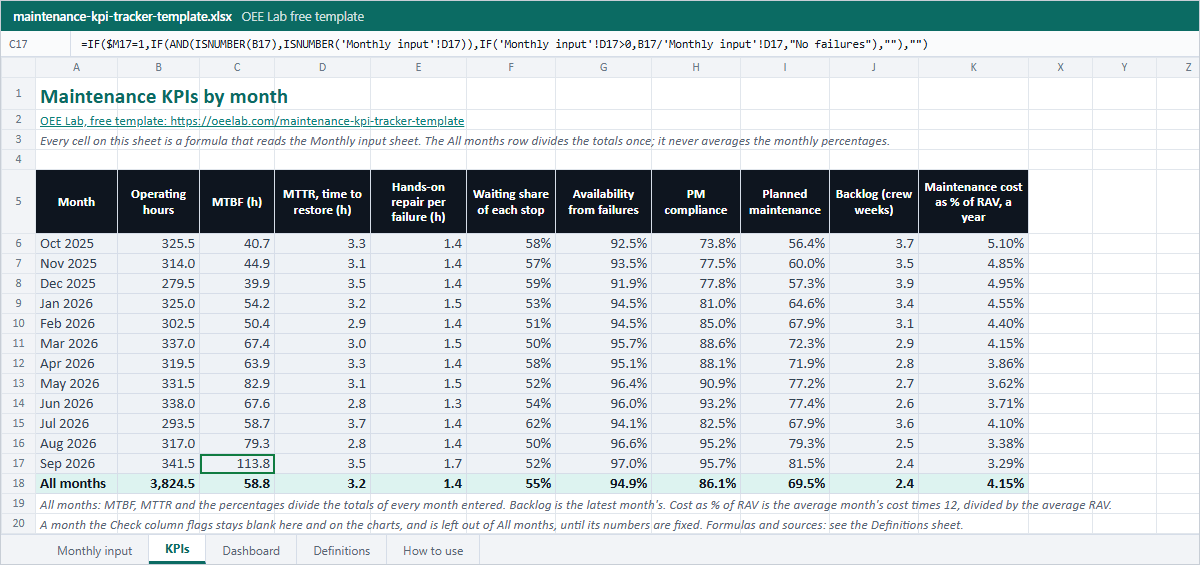
Each formula below is the one in the Excel file and in the tracker above. A target is printed only where a published source gives one; for the rest, the trend of your own months is the yardstick. Which KPIs to pick and how to run the review is in the guide to maintenance KPIs and metrics; this page is the file.
| KPI and formula | What it tells you | Source and target |
|---|---|---|
| MTBF (h)Operating hours ÷ number of failures, where operating hours = planned production hours - downtime from failures | How long the line runs between failures, counting operating time only. Higher is better. In a quiet month one failure more or less moves it a lot, so read it with the failure count. | IEC 60050-192, IEV 192-05-13: mean operating time between failures, for repairable items. No target given. |
| MTTR, time to restore (h)Downtime from failures ÷ number of failures | How long a failure keeps the line down, from the stop until it runs again, waiting for a technician, parts or a release included. Lower is better. | IEC 60050-192, IEV 192-07-23: mean time to restoration. IEC marks "mean time to repair" as deprecated. No target given. |
| Hands-on repair per failure (h)Hands-on repair hours ÷ number of failures | The part of each stop when someone was working on the machine, kept apart so the two meanings of MTTR never mix. | SMRP metric 3.5.2, Mean Time to Repair or Replace (SMRP Best Practices Metrics Workshop, 2018). No target given. |
| Waiting share of each stop1 - hands-on repair hours ÷ downtime from failures | How much of each stop went to waiting rather than repair. Above half, look at call-out, spare parts and permits before repair skills. | Arithmetic on the two rows above. No target. |
| Availability from failuresOperating hours ÷ planned production hours, the same as MTBF ÷ (MTBF + MTTR) | The share of planned hours the line was not down for a failure. Changeovers and other stops are left out, so it reads higher than the availability factor of OEE. | Arithmetic on the IEC terms above. No target given. |
| PM compliancePM tasks done on time ÷ PM tasks due | Whether the preventive plan is done when it is due. Write down what counts as on time and keep it every month. | Common working definition. No target given. |
| Planned maintenancePlanned maintenance hours ÷ total maintenance hours | The share of maintenance hours planned before the work started, PM and scheduled repairs, against breakdown and rush work. | Common working definition. For context, a different measure: in a NIST survey of US discrete manufacturers (2016 data), 45.7% of machinery maintenance was reactive. |
| Backlog (crew weeks)Backlog of ready work (h) ÷ crew hours per week | How many weeks the crew would need to clear the ready work if nothing new came in. A line that keeps rising means work arrives faster than the crew clears it. | Common working definition. No neutral source we checked gives a healthy band, so none is printed. |
| Maintenance cost as % of RAV, a yearMaintenance cost of the month × 12 ÷ replacement asset value | Maintenance spend against what it would cost to replace the assets new, on a yearly scale so one month reads like the yearly ratio. | SMRP: top performers in all industries keep reliable plants under 3% of RAV (2018 workshop). Ron Moore, Reliabilityweb: about 2.5% is a benchmark for a chemical company, while 4% can be excellent for corrosive processes; the ratio is not useful on its own. |
To work out one of these on its own, with more inputs: the MTBF and MTTR calculator, the maintenance backlog calculator and the maintenance cost as % of RAV calculator.
Worked example: September on packaging line 2
September 2026 is the last of the 12 made-up months in the Excel file, and the tracker above opens with it. Packaging line 2 was planned to run 352 hours. It failed 3 times, for 10.5 hours of downtime, of which 5 hours were hands-on repair. 44 of 46 PM tasks were done on time, 238 of 292 maintenance hours were planned, the crew had 168 hours of ready work against 70 hours a week, and maintenance cost 6,900 against a replacement asset value of 2,520,000.
| KPI | Working | Result |
|---|---|---|
| Operating hours | 352 - 10.5 | 341.5 h |
| MTBF | 341.5 ÷ 3 | 113.8 h |
| MTTR, time to restore | 10.5 ÷ 3 | 3.5 h |
| Hands-on repair per failure | 5 ÷ 3 | 1.7 h |
| Waiting share of each stop | 1 - 5 ÷ 10.5 | 52% |
| Availability from failures | 341.5 ÷ 352 | 97.0% |
| PM compliance | 44 ÷ 46 | 95.7% |
| Planned maintenance | 238 ÷ 292 | 81.5% |
| Backlog | 168 ÷ 70 | 2.4 crew weeks |
| Cost as % of RAV, a year | 6,900 × 12 ÷ 2,520,000 | 3.29% |
What it says: MTBF rose from 79.3 hours in August, but each stop got longer, 3.5 hours against 2.8, and 52% of it was waiting. That is where the tracker's look first line points. Cost is at 3.29% of RAV a year, still above SMRP's 3% line, though down from 5.10% in October 2025.
Common mistakes
- Averaging the monthly figures for the year. In the example, the average of the 12 monthly MTBFs is 63.6 hours; the right figure, 3,824.5 operating hours ÷ 65 failures, is 58.8 hours. The All months row adds up first and divides once.
- Counting calendar hours for MTBF. MTBF counts operating time only, so hours with no orders and planned shutdowns stay out.
- Mixing the two meanings of MTTR. Time to restore runs from the stop until the line runs again; hands-on repair is the time someone worked on it. Keep both, and say which one you report.
- Changing the scope from month to month, such as one line in March and the whole hall in April.
- Moving a PM due date when the task slips, so a late task counts as on time.
- Judging MTBF from one quiet month. With three failures, one failure more or less changes MTBF by a quarter to a half; read it with the failure count.
- Reading cost against RAV on its own. What is good depends on the process, as Ron Moore's caveat in the table above shows.
- Copying a target from a page that gives no source. The sources here give a target only for cost against RAV.
When a spreadsheet stops being enough
A monthly tracker works while one person collects the numbers at month end. It starts to slip when the failures, repair times and PM tasks have to be gathered from notebooks and other files first. For that, open the free CMMS app: log tasks and breakdowns as they happen, and its Reports page counts PM compliance, MTTR and MTBF per machine from them, by the definitions above, on one shared computer or tablet (it does not sync between devices). When the stops should be tracked as they happen, that is where Fabrico comes in, with data hosted in the AWS EU region. Book a Fabrico demo to see it on your own machines.
Maintenance KPI tracker FAQ
What KPIs does this maintenance KPI tracker include?
Nine, worked out for every month: MTBF, MTTR as time to restore, hands-on repair time per failure, the share of each stop spent waiting, availability from failures, PM compliance, planned maintenance as a share of maintenance hours, backlog in crew weeks, and maintenance cost as a percentage of replacement asset value (RAV) on a yearly scale. You type 12 numbers a month; the formulas do the rest.
How do I calculate MTBF and MTTR in Excel?
MTBF is operating hours divided by the number of failures, where operating hours are planned production hours minus the downtime from failures. MTTR is the downtime from failures divided by the number of failures. Written with the Monthly input columns, that is =(B6-C6)/D6 for MTBF and =C6/D6 for MTTR; the workbook wraps both in an IF, so a month with no failures shows a note or a blank instead of an error.
Should MTTR include waiting for parts and technicians?
In IEC 60050-192, MTTR is mean time to restoration: from the failure until the item works again, so waiting for a technician, parts or a release counts. "Mean time to repair" is marked deprecated there. This tracker keeps hands-on repair hours in a separate column, so you see both numbers and how much of each stop was waiting.
What is a good maintenance cost as a percentage of RAV?
SMRP's 2018 metrics workshop says top performers in all industries can keep reliable plants under 3% of RAV. Ron Moore (Reliabilityweb) warns that the ratio is not useful on its own: about 2.5% is a benchmark for a chemical company, while 4% can be excellent for corrosive processes. The dashboard draws the 3% line and no other target.
How is PM compliance calculated?
PM tasks done on time divided by PM tasks due in the month. Write down what on time means, the due date or a window around it, and keep that rule every month. The sources this template uses give no target for PM compliance, so compare it with your own trend.
Can I use this as a maintenance KPI dashboard in Excel?
Yes. The Dashboard sheet shows the latest month against the month before, the 12 month figures and six native Excel charts: MTBF, hours per failure, availability with PM compliance and planned maintenance, backlog, cost as % of RAV, and failures per month. It prints on one landscape page and needs no macros.
Can I track several machines or lines?
Keep one file per scope: one machine, one line or one area, the same every month. To combine lines, add up the hours, failures, tasks and costs and divide once, as the All months row does. Do not average the percentages of different lines.
Related: maintenance KPIs and metrics guide · MTBF and MTTR calculator · maintenance backlog calculator · maintenance cost as % of RAV